# How to Build a Claude Agent Team in 7 Steps: From Solo Chat to Parallel Workforce
> **Source**: [@0x_rody on X](https://x.com/0x_rody/status/2058475548242784649) · 2026-05-24
>
> You write code, then review it, then test it, then write the PR, then update docs. Every task, one after another, every day.
>
> There's a way to run all 5 at the same time. One agent handles each task while you focus on the next feature.
---
You write code, then review it, then test it, then write the PR, then update docs. Every task, one after another, every day.
There's a way to run all 5 at the same time. One agent handles each task while you focus on the next feature.
Here's how to set it up in 7 steps 👇

---
## Step 1: Understand the 3 levels
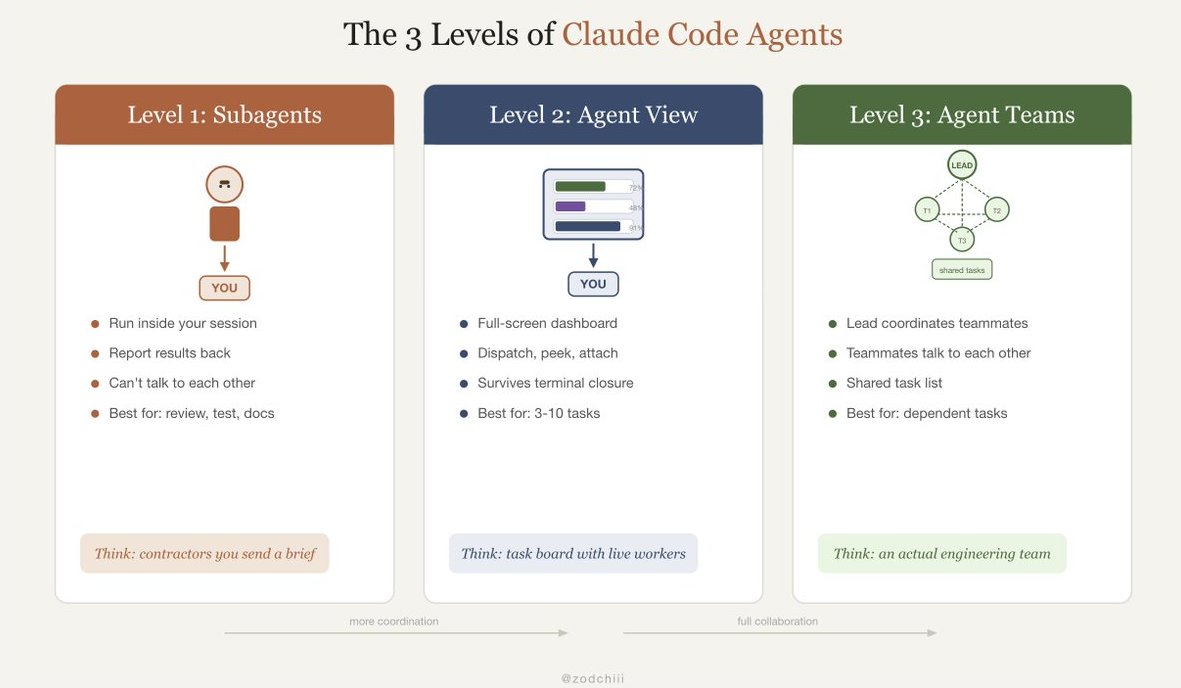
Before building a team, you need to know what's available. Claude Code ships three agent capabilities, each solving a different problem:
**Level 1: Subagents**
→ Run inside your current session
→ Report results back to you
→ Can't talk to each other
→ Best for: repeatable tasks (review, test, docs)
→ Think: contractors you send a brief
**Level 2: Agent View**
→ Full-screen dashboard showing all sessions
→ Dispatch, peek, attach to any agent
→ Sessions survive terminal closure
→ Best for: 3-10 independent tasks
→ Think: a task board with live workers
**Level 3: Agent Teams**
→ One lead agent coordinates teammates
→ Teammates communicate with each other
→ Shared task list, real collaboration
→ Best for: dependent tasks across files
→ Think: an actual engineering team
Most people never get past Level 1. Today we're going to Level 3.
---
## Step 2: Enable Agent Teams
Agent Teams is experimental. Enable it first:
```
export CLAUDE_CODE_EXPERIMENTAL_AGENT_TEAMS=1
```
Add this to your **`~/.zshrc`** (Mac) or **`~/.bashrc`** (Linux) so it's always on.
---
## Step 3: Write your first team prompt
The key difference from regular prompting: describe the full project and let the lead agent decompose it.
```
I need to build a user authentication system. Spawn separate agents to handle:
1. Backend: Create Express.js routes for login, signup, and token refresh
2. Frontend: Build React login and signup forms with validation
3. Testing: Write integration tests for all auth endpoints
4. Review: Review all code produced by the other agents for security issues
```
The lead agent breaks this down, assigns roles, and spawns teammates. Each teammate works in its own context window. You see output indicating which agents are active and what each is working on.
---
## Step 4: Route models to save cost
Running 5 Opus agents in parallel burns tokens 5x faster. Route your team intelligently:
```bash
# Lead agent: Opus (needs to reason about architecture)
# Teammates: Sonnet (focused execution tasks)
export CLAUDE_CODE_SUBAGENT_MODEL="claude-sonnet-4-5-20250929"
```
The lead agent runs on whatever model you're using (Opus for complex work). All teammates automatically use Sonnet at 1/5 the cost. Same quality for focused tasks, fraction of the spend.
---
## Step 5: Use Agent View to manage everything
Once your team is running, switch to the dashboard:
```bash
claude agents
```
Full-screen view showing every session:
```
┌─────────────────────────────────────────────┐
│ Agent View │
├──────────┬──────────┬───────────────────────┤
│ Backend │ Frontend │ Testing │ Review │
│ ██████░░ │ ████░░░░ │ ░░░░░░░░░ │ waiting │
│ 72% │ 48% │ queued │ for deps │
├──────────┴──────────┴───────────────────────┤
│ > dispatch new task │
└─────────────────────────────────────────────┘
```
From here you can:
- **Dispatch** new tasks to the team
- **Peek** at any agent's progress without interrupting
- **Attach** to an agent when it needs input
- **Close your laptop** and agents keep working (sessions survive terminal closure)
---
## Step 6: Set up the decision framework
Not every task needs a team.
Using agents on simple tasks wastes tokens.
Here's when to use what:
```
Single prompt, single file fix
→ Regular Claude Code session. No agents needed.
3 independent tasks, no dependencies
→ Agent View. Dispatch all 3, check results when done.
Repeatable workflow (review, test, docs)
→ Subagents with YAML config. Consistent every time.
Multi-file feature with dependencies
→ Agent Teams. Lead coordinates, teammates collaborate.
Overnight backlog drain
→ Headless mode with --max-budget-usd cap.
```
The wrong orchestration mode wastes both time and tokens. Independent tasks don't need Agent Teams coordination.
Dependent tasks shouldn't run in isolated Agent View sessions.
---
## Step 7: Add guardrails
Multiple agents running in parallel means multiple things can go wrong simultaneously.
Lock it down:
```json
{
"permissions": {
"allow": [
"Read", "Glob", "Grep", "LS", "Edit",
"Write(src/**)", "Write(tests/**)",
"Bash(npm test *)", "Bash(npx tsc *)",
"Bash(git add *)", "Bash(git commit *)"
],
"deny": [
"Read(**/.env*)", "Read(**/.ssh/**)",
"Bash(rm -rf *)", "Bash(sudo *)",
"Bash(git push *)", "Bash(npm publish *)"
],
"defaultMode": "acceptEdits"
}
}
```
And always set a budget cap for team sessions:
```bash
claude -p "build the auth system" --max-budget-usd 15.00
```
5 agents at $3 each = $15 cap for the entire team. No single agent can run away.
---
## The full setup (copy-paste ready)
### **Environment variables**
```bash
# Add to ~/.zshrc or ~/.bashrc
export CLAUDE_CODE_EXPERIMENTAL_AGENT_TEAMS=1
export CLAUDE_CODE_SUBAGENT_MODEL="claude-sonnet-4-5-20250929"
export CLAUDE_CODE_DEFAULT_EFFORT=high
export CLAUDE_CODE_DISABLE_ADAPTIVE_THINKING=1
```
### **Team prompt template**
```
I need to [describe the full feature].
Spawn separate agents:
1. [Role 1]: [specific task with files/modules]
2. [Role 2]: [specific task with files/modules]
3. [Role 3]: [specific task with files/modules]
4. Review: Review all code for [bugs/security/style]
Each agent works in its own context. Coordinate through the shared task list. Flag dependencies before starting dependent tasks.
```
### Guardrails in `settings.json`
```json
{
"permissions": {
"allow": ["Read", "Glob", "Grep", "Edit", "Write(src/**)", "Write(tests/**)"],
"deny": ["Read(**/.env*)", "Bash(rm -rf *)", "Bash(git push *)"],
"defaultMode": "acceptEdits"
}
}
```
### The before and after
```
BEFORE (solo):
- One task at a time
- You write, review, test, commit, all sequential
- A 4-part feature takes a full day
- Context bloats as you switch between tasks
AFTER (agent team):
- 4 agents work in parallel
- Backend, frontend, tests, review running simultaneously
- Same feature done in 2 hours
- Each agent has clean, focused context
- You review and merge the results
```
Same tool. Same subscription. The difference is one environment variable and a prompt that says "spawn separate agents."
---
**Thanks for reading!**

---
**原推文链接**: https://x.com/0x_rody/status/2058475548242784649