---
title: "From prompter to loop engineer: the 14-step roadmap to running agents you don't babysit"
author: "Jey (@Jeyxbt)"
source_url: "https://x.com/Jeyxbt/status/2069502825181147213"
published_at: "2026-06-23T19:28:17.000Z"
fetched_at: "2026-06-24T17:04:26Z"
updated_at: "2026-06-24T17:04:26Z"
language: "en"
review_status: "source-checked"
---

# From prompter to loop engineer: the 14-step roadmap to running agents you don't babysit
The builder behind Claude Code stopped prompting his agent. This is the 14-step system he switched to.
> **Claude Code creator:** "I don't prompt Claude anymore. I have loops running. They're the ones prompting Claude and figuring out what to do. My job is to write loops."
When the person who built the tool tells you the way you're using it is already a generation behind, that's worth a second look. Stop prompting coding agents. Start designing loops that prompt your agents for you.
Here's the shift in one breath. A prompt runs once and stops. A loop runs over and over until a goal is actually met. Loop engineering is replacing yourself as the person who hits enter. You design the system that does it instead.
Most people overcomplicate it. It's simpler than the hype makes it sound. This is the 14-step roadmap from typing prompts one at a time to running agents that finish the job while you sleep.
**3 parts. 14 steps. Stop prompting. Start designing.**
---
## PART 1 - The shift from prompter to loop engineer
### 1. Understand what a loop actually is
A normal prompt is one shot. You ask, it answers, it stops, and then you read it and ask again. A loop is a prompt that re-runs itself until a specific goal is complete. Reason, act, observe, then check the result against the goal and go again. It only comes back to you when it's done.
### 2. Stop thinking in tasks, start thinking in goals
The prompter's whole day is small instructions, one at a time. The loop engineer hands over a goal and a rule for "done," then lets the system drive itself there. You go from issuing a hundred keystrokes to writing one objective the loop chases on its own.
### 3. Run the four-condition test before you build anything
Not every task deserves a loop. Most don't. Before you wrap something in one, run it through four questions:
> Does the task repeat? A one-time job just needs a prompt.
> Is there a clear definition of done? A loop needs a finish line it can recognize.
> Can you afford to be wasteful? A loop keeps prompting itself until it's satisfied, so it burns tokens.
> Does it have the tools to finish and to check its own work? If it can't verify, it can't loop.
Yes to all four, and you have a loop candidate. Miss one box, and it stays a manual prompt.

### 4. Accept the iteration curve
AI never one-shots anything good. Put attempts on one axis and quality on the other, and the line climbs with every round of feedback. Attempt one lands at maybe 50%. Each correction nudges it higher until you're somewhere you'll accept. The whole insight is to outsource that feedback-and-iteration climb to the agent instead of running it yourself by hand. By attempt three or four the loop is already past where you'd have stopped typing.
---
## PART 2 - The four building blocks of a loop that works
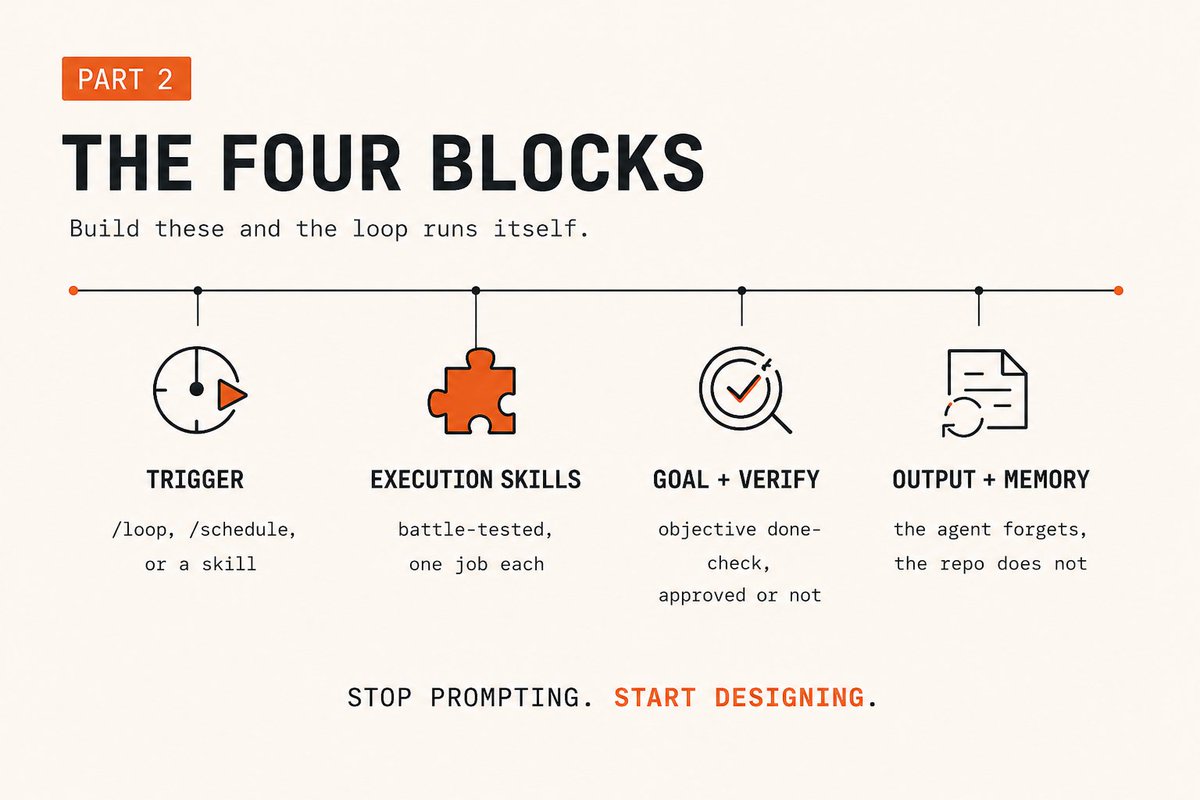
Strip away the jargon and a loop is three moving parts: a trigger, an action, and a stop condition. Build the four blocks below and those three parts run themselves.
### 5. The trigger: what kicks the loop off
Three simple ways to start one, easiest first:
- **/loop** runs on a set interval on your machine. "Every 6 hours, check today's weather and tell me if I should change my plans." Simple, but it dies when you close your laptop.
- **/schedule** runs the same thing in the cloud on whatever cadence you set. 8am every day, laptop shut, running remotely.
- **A custom loop orchestration skill** is one saved skill that already holds the goal, the steps, and the verification. You type /check-weather-loop, hit enter, and the whole thing fires. This is how the builders actually run them day to day.
### 6. Execution skills: the most important block
You don't build a loop without battle-tested skills behind it. A skill is a saved set of instructions that runs the same way every time, so you stop re-typing it. The orchestration skill from step 5 doesn't do the work itself. It calls specialized execution skills, each one a single job the agent already knows how to do your way.
That difference is the whole game. Without an /analyze-workout skill, the loop sees rain and says "cancel your run." With a skill that knows you love running in the rain, the answer flips. The skill is where your judgment lives. Battle-test it alone first, then let a loop call it.
### 7. The goal: make it objective
Every loop needs a goal it can recognize as finished. "Launch the site to this domain and make sure it loads in under two seconds" beats "make the site good." The strongest loops read like a metric: keep iterating until this number hits that target. The fuzzier the goal, the more the agent can drift.
### 8. Verification: bridge the abstract to something checkable
A goal and its verification are the same move. You can't set a goal the loop can't confirm. For code it's clean: hit the domain, check the content loads, measure the load time, and make a review skill approve the changes before it stops.
For fuzzy work you build the bridge yourself. A /writing-voice skill and a /fact-checker skill that each return approved or not approved, or a score from 1 to 10. Now an abstract goal has a checkable gate. A loop is only ever as good as its done-check.
### 9. Add a second pair of eyes
The agent that did the work is a biased grader of it. Hand the output to a different one. A separate sub-agent, or a different model entirely, gives a cleaner read than the agent that wrote the thing. This is the maker-checker: one agent makes, one agent grades and feeds the notes back into the loop.
### 10. Output and memory: the part everyone skips
A loop produces something. Obvious. The half people miss is memory. Every loop starts from scratch unless you record what happened, and no record means no improvement. You hit the same wall and pay the same tokens on every run.
Addy Osmani put it in one line: the agent forgets, the repo doesn't. Anthropic's own guidance is just as plain. Give it a place to write notes, as simple as a markdown file. One log of what worked and what failed turns a loop that repeats into a loop that improves.
---
### PART 3 - Run it without babysitting
### 11. Start small, with loop training mode on
Pick the smallest thing you've already proven works by hand. For the first few runs, turn on loop training mode, a step-approval mode where the loop pauses at every step until you approve it. The output reads like *quick check before I burn the tokens*, and then it waits. You watch it do what you actually meant before you let it off the leash. Once you trust it, turn training mode off and let it run clean.
Here's a prompt to scaffold one:
```
You are helping me build a loop orchestration skill in Claude Code.
Goal of the loop: [the repeating task, in one sentence]
Definition of done: [the objective rule that means it's finished]
Build the skill with:
1. A trigger I can run as /[name]-loop
2. The execution skills it should call (list the ones that already exist)
3. A verification step that returns approved / not approved or a 1-10 score
4. A separate sub-agent to grade the output, not the agent that produced it
5. An output file and a memory file that logs what worked and what failed each run
Start in loop training mode: pause at every step for my approval before continuing.
Do not run past the done-check.
```
### 12. Set your human checkpoints
Treat the agent like an intern. "Plan the company party" could go anywhere, so you'd want sign-off on the date, the venue, and the theme before it spends a dollar. A loop is the same. Find the moments where a wrong turn shoots the entire rest of the run, and make those your human verification checkpoints. The fewer of those you actually check, the further off course it drifts.
### 13. Pick the loop shape that fits
Three shapes cover almost everything:
- **Solo loop** - one agent reasons, acts, observes, repeats. Most jobs need nothing more than this.
- **Maker-checker** - one agent does the work, one grades it and sends feedback back in.
- **Manager with helpers** - one orchestrator runs a handful of sub-agents underneath it.
Don't reach for a fleet of round-the-clock agents because a tweet made you feel behind. Scale the architecture to the job, not to the screenshot.

### 14. Match the loop to its cost and your actual work
A hard goal with a hard done-check can run for 12 hours, and plenty of those runs aren't worth what they cost. The useful ones tend to be 30 minutes to a couple of hours, or one chunky job you fire before bed and read in the morning. A loop that checks 45 sources to decide what to build is worth the wait. A four-day run usually isn't.
And not everyone needs agents working around the clock. A solo operator doing knowledge work uses loops differently than a team refactoring a codebase all day. Borrow the method, not someone else's volume.
### The compound part
Here's everything that makes a loop actually work, on one line:
> A checkable goal. A hard stop. The right tools. Memory. A separate checker. A plan before it runs, a log after.
Miss the verification and you don't have a loop. You have an agent guessing in a circle.
The prompt engineer asks for one good output and checks it himself. The loop engineer builds the system that produces a verified one without him. The typing was never the valuable part.
Run the four-condition test on something on your plate right now. What's the first job you'd actually hand to a loop?