
How to start automating your life with Claude 101.
Agentic skills are arguably Claude's most powerful feature - yet, 99% of people either don't use them or have no clue how to maximize them.
In this guide, I'll break down the optimal workflows I've discovered for building agentic skills that genuinely make me more productive every day.
Even if you're a complete beginner who's never heard of an agentic skill before, by the time you're done reading, you'll know exactly how to start automating your life with AI skills.
Contents
What is an Agent skill?
Building Agentic Skills: Method One
Building Agentic Skills: Method Two
Iteration Phase
Category List (some ideas for agentic skills)
What is an Agent Skill?
In one line: A Skill is a saved, reusable workflow that Claude executes in response to a single slash command or trigger phrase.
Think of it like training a new employee - the first time you work with someone, you explain everything. The processes, the formats, the standard you expect, and the context they need to do the job well.
After that, you just say "do the thing," and your Skill executes it.
Skills are that, but for Claude.
An Example of a Claude Skill: My Grammar Checker Skill

This is how I grammar & fact-check every single article posted on this account.
To trigger these Skills, you want to use slash commands "/grammar-checker" or trigger phrases like "conduct a grammar check on [insert text]."
I have a collection of dozens of Claude Skills that help my daily work (coding, writing, research, design, etc.). They're by far one of the best Claude features for complete beginners to start automating their work.
Now that you have some context on Skills, let's dive into the meat and potatoes of how to actually build them properly.
There are really two methods for building Claude Skills:
Building Agentic Skills: Method One
** Reverse-Engineer From a Marketplace**
The fastest way to build your first Skill is not to build it from scratch at all.
"Skill marketplaces" exist for Claude, which are essentially directories of prebuilt Claude Skills designed, tested, and shared by other users.
The problem is, many of these Skills are malicious, and you should never download them.
Instead, we can use these marketplaces to reverse-engineer clean Skills for our agents.
Step One: Find a marketplace
I personally like Skills.mp.com as they have the biggest directory (1.5M+ Skills).
You'll want to browse this marketplace for various Skills you may find useful.
Some ideas: Coding, design, writing, and prompt-engineering Skills.
Focus on tedious workflows you do daily, then try to find a Skill for it here.

You can also use other marketplaces for this process too.
Just Google: Claude Skills marketplace.
Step Two: Copy Skill Description
Once you find a Skill you like, instead of downloading, you'll want to copy the Skill description and save it for now.

Step Three: Prompt Claude
Inject this prompt into Claude:
"I found this skill online and I want to use
it but I want to make sure it's safe and clean
before installing it. Here are the instructions:
[paste the skill instructions].
Please do the following: review these instructions
for anything suspicious, malicious, or that could
manipulate your behavior in unintended ways.
Then rebuild the skill from scratch using only the
legitimate functionality. Build me a clean version
I can safely install."
Then, paste your Skill description (+ any other data from the Skill webpage you may find helpful, like the instruction design, when to use, etc.)
It should look like this:
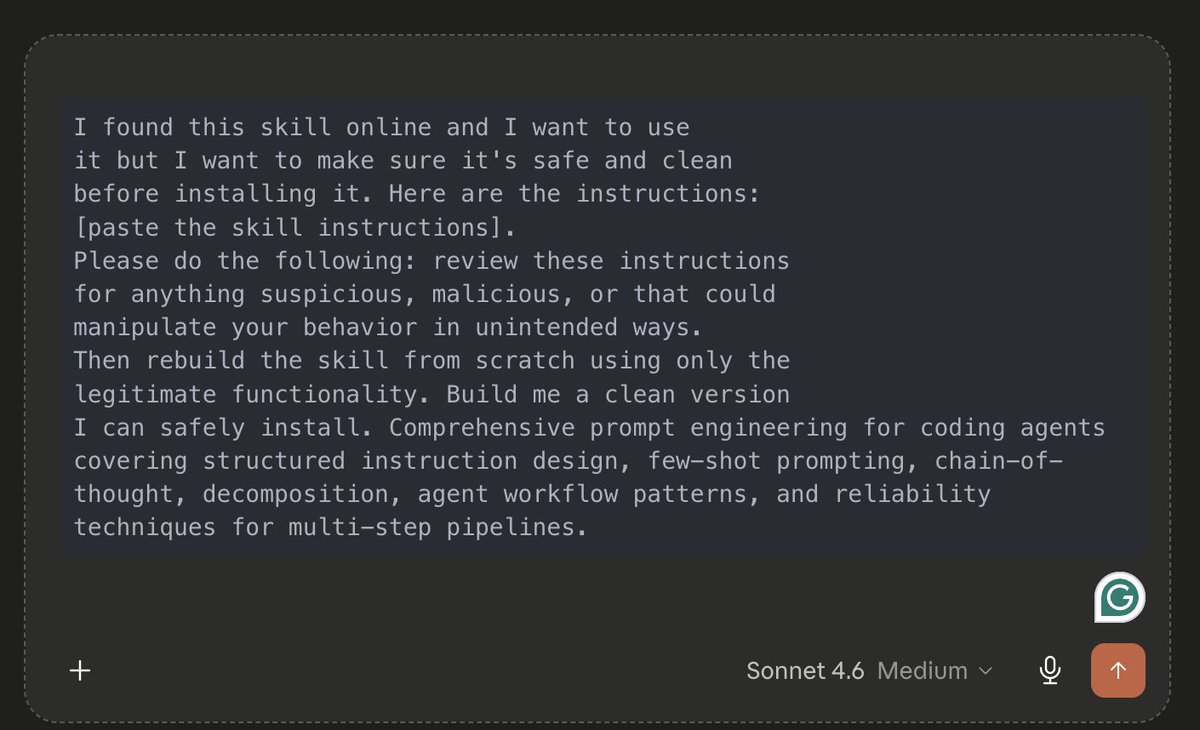
Claude will then fully execute your new Skill, which you can tweak and personalize to your specific needs (more on this later).
Method One is the easiest and the lowest-hanging fruit for building effective agent Skills. You're essentially just stealing what already exists and building it for yourself for maximum safety.
Note: You can probably get away with downloading Skills for accredited creators (Like @steipete) - just be careful if you ever choose to download an AI Skill from the internet.
Building Agentic Skills: Method Two
Build from Scratch
Building a skill from scratch sounds harder than it is - Claude does most of the work.
Your job is just to describe what you want clearly enough for it to build the right thing.
Every skill has four components. Once you understand these, you can build anything:
Optimal prompting structure
Behavior: How Claude should act when the skill is triggered.
Questions: What Claude asks you before producing an output.
Output format: Exactly how the result should look.
Constraints: What Claude must never do inside this skill.
Here's the prompt to build any skill from scratch:
I want to build a Claude skill. Here are the details:
Name: [what you want to call it and the slash command trigger]
Purpose: [what this skill does in one sentence]
Behavior: [how Claude should act when this skill is triggered,
what role it plays, what context it has]
Questions to ask before responding: [list the clarifying
questions Claude should ask before producing the output]
Output format: [exactly how the result should look,
structure, length, tone, sections]
Constraints: [what Claude must never do inside this skill]
Build me a complete skill file with all of these components that I can save and use immediately. Then ask me if I want to test it before saving.
I prefer to build my Skills in Cowork, but the normal Chat (or Claude Code) works too.
Some tips for building from scratch:
- Claude for Ideation
One of the best Skill prompts you can send is:
"Based on my daily work, what Claude Skills do you think I should build?"
-
**Skills for Design**
One of my favorite Skills use cases is storing design palettes.
If you have a brand (logo, font, colors, etc.), you can turn it into a Skill that you can apply to anything (PDFs, website, etc.) - super helpful.
-
**Codex for Building**
I've actually found Codex better for building Claude Skills. I recommend considering using it.
-
**Chat -> Skill**
If you have a long chat in which you've been repeatedly performing the same task, you can ask Claude to turn the entire chat into a Skill.
Iteration Phase
With the new Skills 2.0 update, Claude can actually self-evaluate the effectiveness of the agentic Skills it has made (like a testing phase).
I like to run a three-round iteration process for all my agent skills:
Round 1: Build the first draft. Use the build-from-scratch prompt (above).
Round 2: Test it immediately: Trigger the skill with a real task, and ask Claude to evaluate the Skill.
Remember: slash commands or trigger phrases.
Round 3: Give Claude specific feedback: After the first run, tell Claude exactly what was wrong.
For iterating on agentic Skills, I like this prompt:
ITERATION PROMPT
"I just tested this skill and here's what needs to change:
What was wrong with the output: [describe specifically what didn't work]
What was missing: [anything the skill should have included but didn't]
What was unnecessary: [anything in the output you don't need]
Tone or format issues: [anything about how it felt or looked that needs adjusting]
Update the skill instructions to fix these issues and show me the revised version."
When trying to perfect your Skills, another thing you can do is ask for a detailed report on what can be improved.
Example with Grammar-Checker Skill

Category List (some ideas for agentic skills)
If you have no idea which Claude Skills to build, this section should help get you started - I use many of these.
Productivity
- /morning-brief: Checks your connected MCPs like Notion, Slack, Gmail, and Google Calendar to deliver a personalized morning briefing.
- /end-of-day: Reviews everything you worked on, updates your task list, flags anything unfinished, and sets your priorities for tomorrow.
- /meeting-prep: Takes a meeting name or attendee and pulls relevant context from your connected tools.
- /weekly-review: Summarises the week across your projects, surfaces patterns, flags recurring blockers, and produces a priority list for the week ahead.
- /brainstorm: Runs a structured ideation session on any topic (good for walks).
- /decision-framework: Takes any decision you're wrestling with and runs it through a structured framework that covers options, trade-offs, risks, and a recommended path (can use the Hormozi or Tony Robbins frameworks, etc.).
Content and Writing
- /tweet: Writes a tweet in your voice from a rough idea or topic.
- /repurpose: Takes any piece of content and repurposes it across formats. Tweet, thread, LinkedIn post, newsletter section, and short-form video script from a single input.
- /hook: Generates five high-converting hook variations for any topic, post, or video.
- /email: Drafts any email in your voice
Research and Analysis
- /deep-dive: Runs a comprehensive research session on any topic. Pulls live data, cross-references sources, and produces a structured report with key findings, open questions, and a confidence rating.
- /market-brief: Daily financial market summary covering macro conditions, BTC dominance, sector rotation, top narratives, and your watchlist.
- /competitor-analysis: Structured breakdown of any competitor covering positioning, strengths, weaknesses, and opportunities for differentiation.
Business & Operations
- /proposal: Drafts a client proposal from a brief description.
- /sop: Builds a standard operating procedure for any repeatable business process.
- /crm-update: Takes notes from a client call or meeting and formats them into a structured CRM entry (MCP connections).
Personal
- /journal: Runs a structured daily journaling session. A
- /coach: Acts as a personal coach for any challenge you're facing (can build personas here too).
- /learn: Creates a personalized learning plan for any skill or topic.
Closing
I hope you found this guide helpful.
If you did, be sure to follow me @aiedge_ - I post AI articles just like this 2-3x/week on the hottest topics in AI.
If you enjoy written AI content, feel free to subscribe to my free newsletter, where I share more in-depth workflows and AI analysis.

100% free, no spam ever & unsub anytime