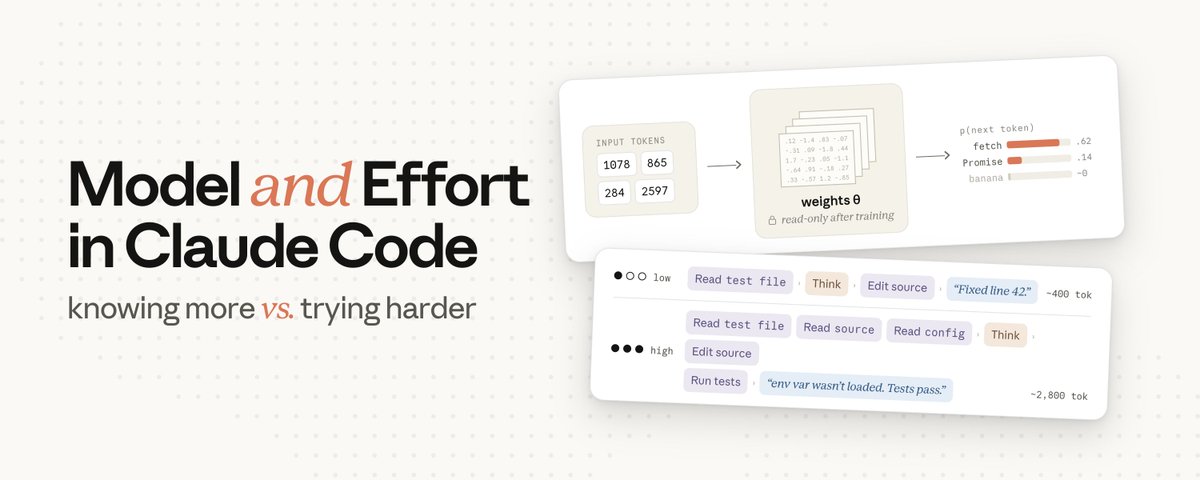
Claude Code gives you two settings that both seem to "make the answer better": the model, and the effort level. But what do these actually do to the output? And how do you know whether to reach for a different model or just change the effort level?
It's easy to assume that choosing a larger model like Fable gives you a smarter output than Sonnet, and that a higher effort level just means Claude thinks longer before it answers.
The first assumption is true. Our largest models are more capable, according to industry-standard benchmarks.
But effort means more than "thinking time." Effort controls how much work Claude does on your request overall. That includes how long it thinks, but also:
- how many files it reads;
- how much it verifies; and
- how far it pushes through a multi-step task before checking in with you.
At higher effort, Claude takes more of those actions (read files, run tests, double-check) before it comes back to you. At lower effort, it would rather ask you for more context than spend tokens figuring something out on its own.
How model selection works
To understand what the model setting actually controls, it helps to start at the very beginning, from the moment you press enter.
Claude Code assembles your message together with the system prompt, tool definitions, your CLAUDE.md, the conversation history, and any files in context. All of this is sent as one request to the API.

The model never sees any of that as plain text, though. The first thing that happens on the server is tokenization: the text gets split into pieces, and each piece is mapped to an integer from a fixed vocabulary the model was trained with. const might map to 1978, await might map to 4293. From here on, your prompt is an array of integers.

The model's job is to take that array and predict which token comes next. It does this by computing a probability for every token in its vocabulary and picking from the top. After "const x = await", a well-trained model puts high probability on "fetch" (very likely) and near-zero on "banana" (not likely at all).

What turns your input tokens into those probabilities is the weights (also called parameters): billions of numbers organized into large matrices. To predict one token, the model runs your input through those matrices (a long chain of matrix multiplications) and reads the probabilities at the end. The weights are where everything the model "knows" lives.
The weights of each model are set during training, and by the time you're sending requests** they're read-only**. Nothing in your prompt, your CLAUDE.md, or your context changes them. If you've run into the word inference, that's all it means: using the model after training is done, with the weights fixed.

Everything Claude knows about TypeScript, popular frameworks, or any other general programming knowledge was encoded into those weights at training time.
Your prompt and context can still steer the prediction. Putting your real code in front of Claude is steering, and it works really well. However, this doesn't add anything to the weights themselves.
If a library didn't exist when the model was trained, it isn't in the weights. You can put the docs in context and Claude will use them, but that's steering, not teaching. Claude's response is only influenced for that one request, but the underlying model hasn't retained anything.
When Claude confidently calls an API that doesn't exist (a hallucination), that's the weights producing a token sequence that looks plausible from training patterns, not a failed lookup.
So what does changing the model actually do? It swaps which set of frozen weights handles your request.
The model doesn't generate a whole answer at once. It predicts one token, appends it to the sequence, and runs the whole computation again to get the next one. A 200-token response is 200 separate passes through the weights. This loop is where most of your wait time (and your output cost) comes from.
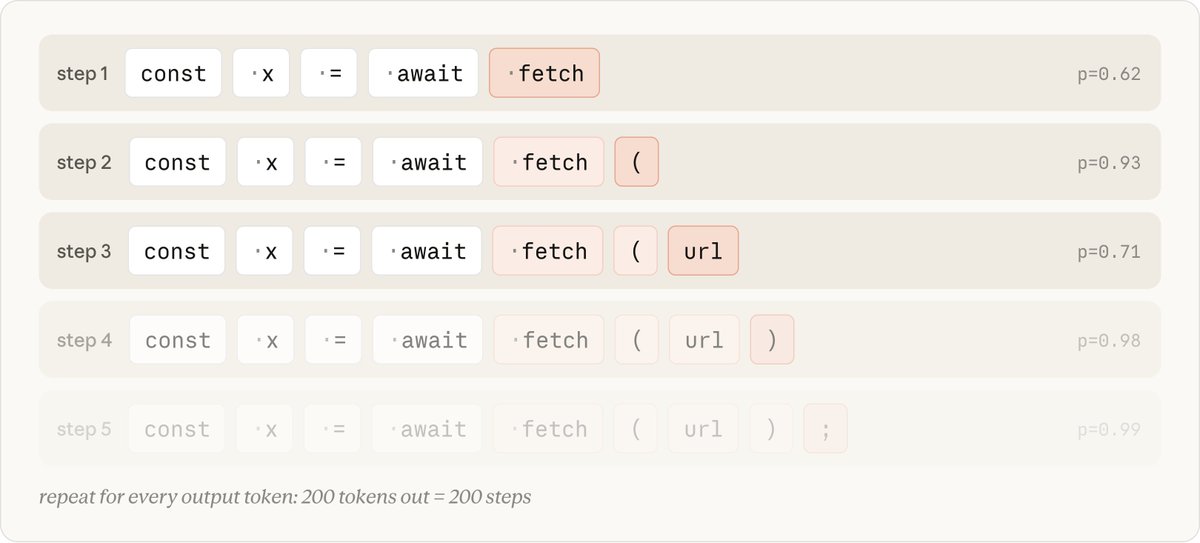
The model setting decides which weights handle your request, and it also decides what each output token costs.
What it doesn't decide is how many tokens get generated. That number can vary a lot for the same prompt, depending on how much work Claude decides to do.
Which is exactly what effort controls.
How effort works
While Claude Code is working on a task, the tokens it generates fall into a few categories:
- Thinking: the reasoning you see streaming before and between actions.
- Tool calls: structured blocks naming a tool like Read or Edit and its arguments, which Claude Code then parses and executes.
- Text to you: the plan, progress updates, the summary at the end.
These are all ordinary output tokens from the same loop, billed at the same rate. Thinking tokens, for example, are generated exactly like the other output tokens and stay in context for the rest of that turn.
By the time Claude moves on to writing code, its earlier reasoning is part of the input, just like a file it read.

So how does effort change any of this? The effort level is sent to the model as part of the request, right alongside your prompt. The model was trained to understand how to behave at each effort level, and that learned behavior is baked into the frozen weights.
When your request arrives, effort is just one more input the model responds to, the same way it responds to your prompt text. It sets how thorough, and how certain, Claude needs to be before it considers the task done. That gets weighed on every turn, and higher confidence takes more tokens to reach.
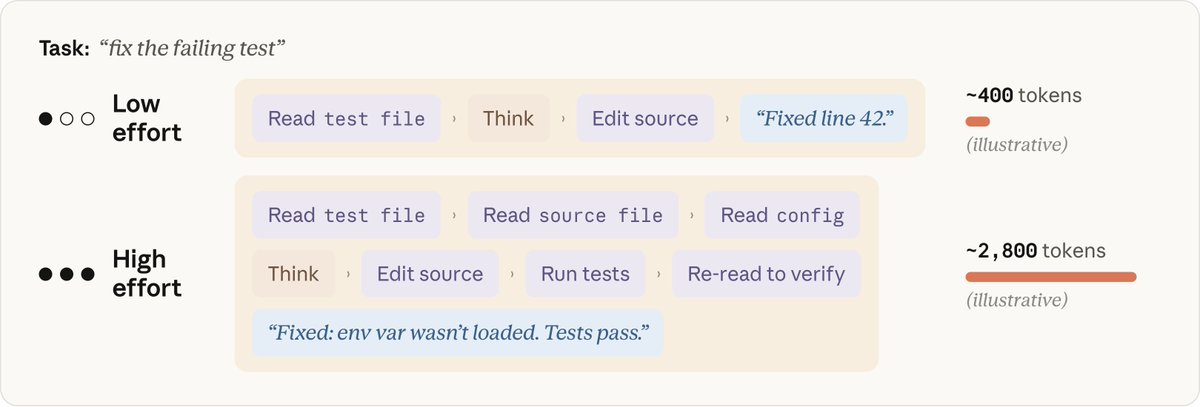
At higher effort levels, Claude often starts by creating a plan, and the effort level influences the depth and breadth of that plan. But the plan isn't frozen in place. As Claude gets results back from its actions, it updates its picture of how much progress it's made and how certain it is of the accumulated result.
When step 1 of a three-hypothesis debugging plan finds the bug, "investigate hypotheses 2 and 3" may no longer be necessary. Claude will usually say this explicitly (e.g. "the first check found it, so the remaining checks aren't needed") and skip ahead. You see this happen in Claude Code when task lists get revised mid-run.
Higher effort does make Claude more likely to double-check, like verifying the answer it found, or still look into the hypotheses it could have skipped. However, it generally won’t artificially inflate usage on a simple task just because the effort level is turned up. "Overthinking" is something our team specifically watches for during model training as it degrades effectiveness.
Picking an effort level
For most tasks, use the model's default effort level. The default is the level where Claude scales its token usage to what most people would want to spend on a task.
Think of effort as a manual override on how hard and how long Claude works. Reach for it deliberately when you have a strong preference for thoroughness or speed based on your domain or the type of work you do, and treat it as a general preference, not a task-by-task decision.
One practical note following the launch of Opus 4.8: in our testing, the default effort setting on Opus 4.8 produces better results for about the same amount of tokens as the default effort setting on Opus 4.7 on the same task.
What to change when Claude gets it wrong
When Claude gets something wrong, your first instinct shouldn't be to change a setting. It should be to look at the context you gave it. Is your prompt too vague? Is Claude connected to the right tools? Does it have the right skills?
If you're increasing effort on a task that shouldn't need it, the fix is usually upstream: in your context, your CLAUDE.md, or how the task is scoped.
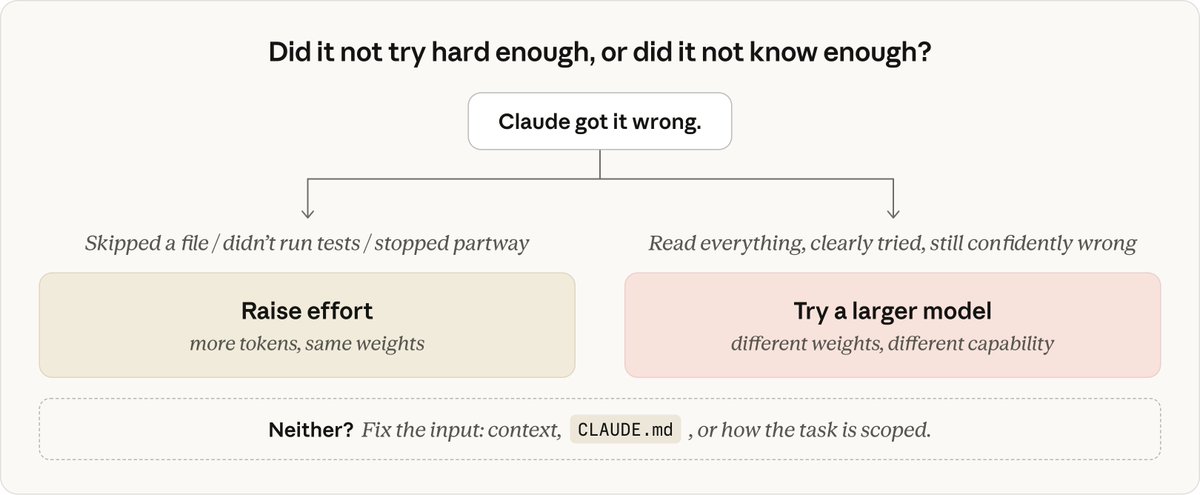
But say you've given clear context and Claude still gets it wrong. The question to ask yourself is: did it not try hard enough, or did it not know enough?
Model: the problem was too hard
Pick a larger model when the problem is genuinely hard, like subtle bugs, unfamiliar domains, architecture decisions. A larger model is what you want when the smaller model is confidently wrong no matter how much context you give it.
Larger models are also better at handling ambiguity. On smaller models, specific instructions that direct the execution are a better recipe for success.
Pick a smaller model when the work is routine: edits you can describe precisely, mechanical changes, questions about code that's already in context. There's no reason to pay for capability the task doesn't need.
If Claude had all the pertinent context, clearly tried, and still got it wrong; that's a signal to pick a larger model. And if you're on the larger model and the work has been routine for a while, dropping down will increase speed and typically reduce cost without impacting the quality of the output.
Effort: Claude didn't try hard enough
Pick a higher effort level if Claude did it wrong by not trying hard enough: skipping a file, not running the tests, or not double-checking its work. This is most relevant if you'd selected an effort level below the model's default.
The specialist, the expert, and the generalist
One way I like to think about the two settings is that Fable is a specialist who can handle problems almost no one else has, Opus is the expert, and Sonnet is a really good generalist. The effort level decides how much time any of them spends on your task.
Opus at low effort is like getting five minutes with an expert who has deep experience with problems like yours. They bring knowledge that isn't anywhere in your codebase; patterns they've seen before, gotchas they know to check for, the kind of experience you only get from having solved a lot of similar problems. But five minutes means a quick read of your code, not a careful pass through every file.
Sonnet at high effort is the generalist with the whole afternoon. They're great at coding, and they'll read everything, run things, double-check their work, and end up understanding your specific code thoroughly.
Fable is the specialist you call when everyone else is stuck. Even at low effort, they'll spot the thing no one else would. That recognition is also what you're paying the most for, so it's worth saving it for the tasks that need it.
None of these is universally "better". The model setting is roughly how capable*;* the effort setting is roughly how thorough. Most real tasks need some of both.
Effort, model, and token consumption
So how do model selection, effort, and token consumption all interact? It depends on the task.
On routine work at the same effort level, both the larger and smaller models generally get it right. The larger model consumes more tokens with extra verification steps, at a higher per-token price. That's why dropping to the smaller model for routine stretches saves real money at no quality cost.

On harder, multi-step work, the equation flips. The smaller model has to grind toward the limit of its ability, burning iterations, while the larger model reaches the same quality bar in fewer steps.
You're paying more per token for the larger model, but on tasks that genuinely stretch the smaller one, the total cost per task can come out lower. And more importantly: the larger model can finish tasks the smaller one can't, even at the highest effort settings.
This is most pronounced with Fable. On long, multi-step work it pulls furthest ahead. In our testing, it finished jobs Opus and Sonnet can't reach at any effort level. It also costs the most per token, which is the other reason to save it for the work that really needs it.

The key point in the graphs above: effort picks how far Claude is willing to travel along the curve. That doesn't mean Claude will need to go that far to finish the task.
Lastly, effort shapes token consumption, but it doesn't limit it. The only hard cap in the system is max_tokens, which truncates a response mid-stream when hit, but it's a blunt instrument and mostly relevant to API developers. Softer controls like task budgets or asking Claude to keep it brief in your prompt are more helpful. They're guidance the model is trained to follow (it'll look to wrap up as it gets near the limit) rather than a wall it runs into.
Effort changes how much work Claude does. The model changes what Claude knows.
When you're unhappy with a result, check the context before you touch either setting: give Claude a clear prompt, the right tools and skills, and a way to verify its own work.
If Claude still gets it wrong, ask yourself: did it not know enough, or did it not try hard enough? Not knowing enough is a model problem, not trying hard enough is an effort problem.
This article was written by @lydiahallie, member of technical staff on the Claude Code team.