Rahul (@sairahul1)
2026-07-13
D
原文
---
title: "如何全天使用 GPT-5.6 而不撞上限额"
author: "Rahul (@sairahul1)"
source_url: "https://x.com/sairahul1/status/2076556282195329249"
published_at: "2026-07-13T06:36:12.000Z"
fetched_at: "2026-07-14T15:37:40Z"
updated_at: "2026-07-14T15:39:50Z"
language: "zh"
review_status: "draft"
---
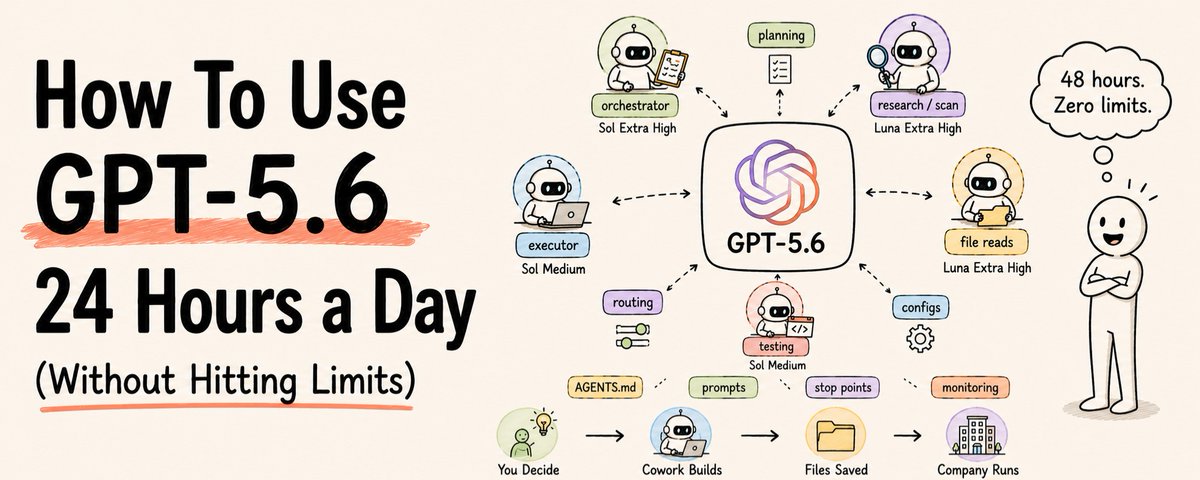
# 如何全天使用 GPT-5.6 而不撞上限额
你花了 200 美元买 Codex Pro。
4 小时就撞上了限额。
5 小时窗口里的 4 小时,就这么没了。
最糟的是?
其中大多数消耗本来完全可以避免。
为了搞明白这件事,我在 GPT-5.6 Sol 上烧掉了价值超过 20 万美元的 token。
这里是我学到的一切——这样你就不用再自己烧一遍了。
━━━━━━━━━━━━━━━━━━
## **为什么你的限额烧得这么快**
### 一个设置。一个 bug。代价是全部限额。

当 Codex 启动 subagent 时,它会精确复制父 agent 的模型。
把 Sol 设成 Ultra?每个 subagent 也都会跑 Sol Ultra。一个任务里 3 个 subagent = 3 个 Sol Ultra 实例同时燃烧。
这就是为什么你的 5 小时窗口会在 90 分钟内消失。
Codex 的 spawn_agent 工具没有选项,可以为子 agent 选择不同模型。
它只是克隆你当前正在运行的东西。
这不是你的错。这是系统里的路由缺陷。
但现在你知道了。而且有办法修。
━━━━━━━━━━━━━━━━━━
### **永远不要碰的模型**

Ultra。
它不是一个推理等级。它是一个倍增器。
Ultra 会在一次 agent 调用里启动 4 个并行的子子 agent。
在一个简单任务上:subagent 启动 subagent,subagent 再启动更多 subagent。
递归。失控。贵到毁灭性。
性能差距呢?
Sol Ultra 在 coding benchmark 上得分 91.9%。Sol Extra High 得分 88.8%。
多 3.1 分。成本 3 倍。
OpenAI 甚至没有公布 Ultra 在两个主要 coding benchmark 上的结果。
这已经说明一切了。
**完全避开 Ultra。就这么简单。**
━━━━━━━━━━━━━━━━━━
### **修好一切的 3 模型系统**
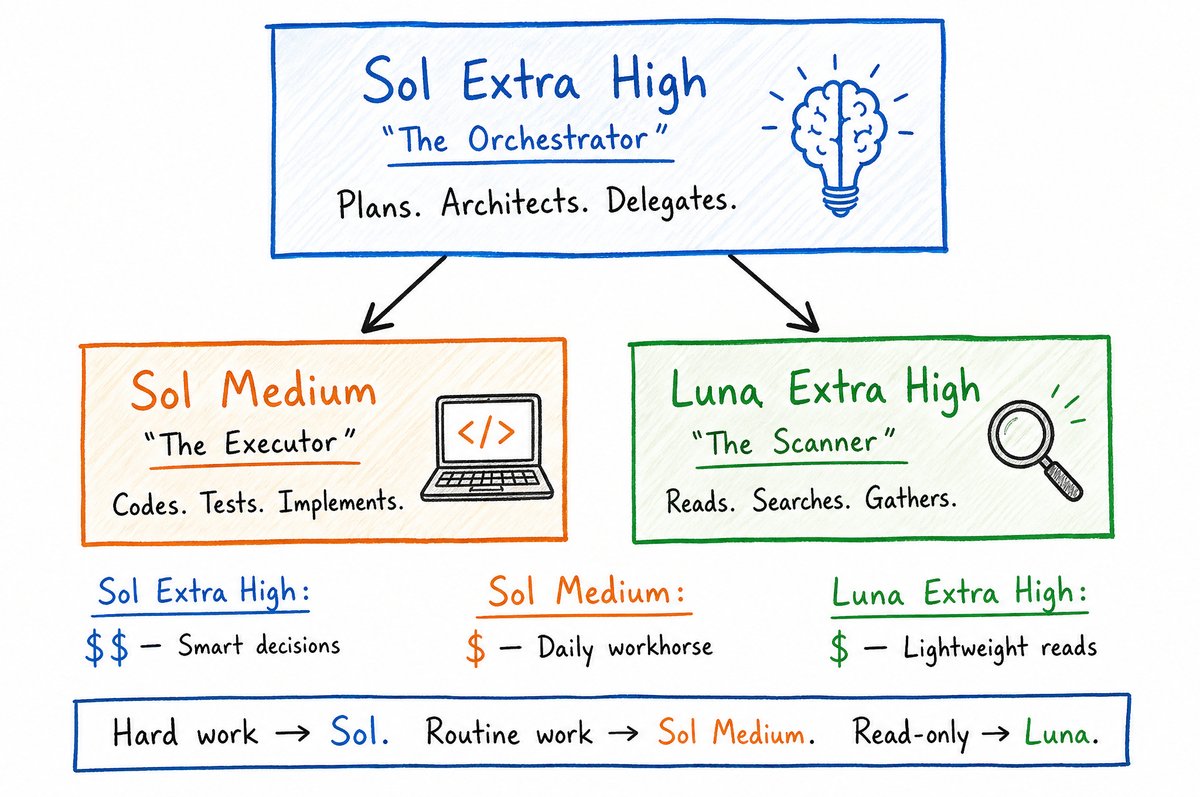
你需要三个 agent 做三种不同的工作。
不是让一个模型用最大功率干所有事。
**Sol Extra High → 编排者**
规划。架构设计。委派任务。做困难决策。
这是你的主脑。它读取你的 prompt,判断需要发生什么。
Extra High 在 benchmark 上给你 58/100。Max 给你 59/100。只差 1 分。便宜 3 倍。
这里 Extra High 才是正确选择。
**Sol Medium → 执行者**
写代码。修 bug。跑测试。实现计划。
在长时间运行的 agent 工作流上,Sol Medium 仍然比 Claude Fable 5 高 11.4 分。
成本大约只有四分之一。
它不需要做架构决策。它只需要很好地执行指令。Medium 完全做得到。
**Luna Extra High → 扫描器**
文件搜索。代码库探索。轻量读取。收集证据。
Luna Extra High 是:
→ 比 Terra 快 1.3 倍
→ 比 Terra 便宜 2.5 倍
→ 在轻量任务上性能相同
这是大多数人会错过的隐藏优选。
Luna 纸面上看很便宜(每百万 token 1 美元 / 6 美元),但会烧掉更多步骤。
到了 Extra High,步骤数会降下来。它就成了只读工作的显然选择。
━━━━━━━━━━━━━━━━━━
### **Sol + Luna 路由技巧(48 小时,零限额命中)**

下面是可以持续运行、又不会烧掉窗口的精确设置:
→ Sol Extra High 写计划
→ Luna Extra High 执行计划
→ Sol Extra High 审查输出
就是这样。
一个循环。没有递归启动。没有后台燃烧的 Ultra 克隆。
分享这个方法的人连续跑了 48 小时,一次都没有撞到 5 小时限额。
它之所以有效,是因为 Sol 专注于决策。Luna 以便宜 2.5 倍的价格处理 token 密集的执行工作。即使你做得更多,总 token 消耗也会大幅下降。
**现在就加到你的 [AGENTS.md](http://AGENTS.md) 里的设置:**
> Only spawn subagents when I explicitly ask you to.\
> Do not spawn subagents automatically.
这会阻止 Sol 在每个任务上都急着启动 agent。
把它加到你的全局 [AGENTS.md](http://AGENTS.md),然后重启 Codex。
━━━━━━━━━━━━━━━━━━
### **5 分钟修好你的 config.toml**
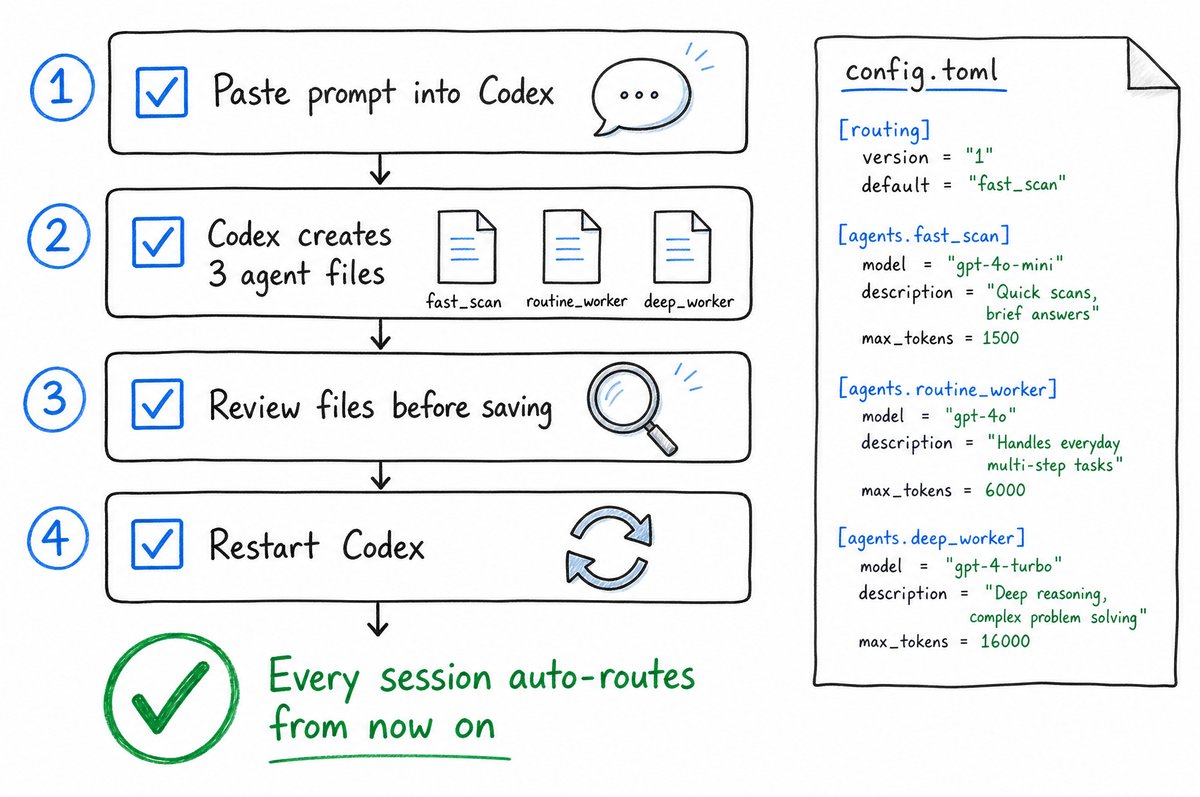
这是真正控制一切的文件。
Codex 启动时会读取它。
设置一次。之后每个 session 都会自动路由。
打开 Codex。原样粘贴下面这个 prompt:
> *Read my current ~/.codex/config.toml and the docs at* [*https://developers.openai.com/codex/subagents*](https://developers.openai.com/codex/subagents)* for custom agent definitions.*
>
> *Then do the following:*
>
> *1. Create three agent TOML files under ~/.codex/agents/:*
> *fast_scan — for quick searches, codebase exploration, file reads, and lightweight analysis.* *- model: gpt-5.6-luna* *- model_reasoning_effort: extra-high* *- sandbox_mode: read-only* *- Instructions: gather evidence quickly, return a concise summary, do not edit files.*
>
> *routine_worker — for routine coding, tests, documentation, and bounded fixes.* *- model: gpt-5.6-sol* *- model_reasoning_effort: medium* *- Instructions: implement the assigned task and verify the result.*
>
> *deep_worker — for difficult debugging, architecture, security, and ambiguous multi-step work.* *- model: gpt-5.6-sol* *- model_reasoning_effort: extra-high* *- Instructions: handle complex work carefully, validate assumptions, provide strong verification.*
>
> *2. Update the [agents] section of my config.toml with this routing policy:*
> *"Automatically decide whether delegation is useful. Choose fast_scan for lightweight read-only work, routine_worker for normal implementation, and deep_worker for complex or high-risk reasoning. Do not ask the user to choose a model unless the required model is unavailable. Keep simple tasks on the main agent."*
>
> *3. Make sure max_threads = 6 and max_depth = 1 are set under [agents].*
>
> *4. Show me the final config.toml and all three agent files so I can review before you save."*
Codex 会创建所有文件。你审查。你保存。完成。
━━━━━━━━━━━━━━━━━━
### **你的 3 个 agent 文件应该长什么样**

Codex 会根据上面的 prompt 自动生成这些文件。
下面是它们应该呈现的样子——这样你知道该审查什么:
> \# ~/.codex/agents/fast-scan.toml\
> name = "fast_scan"\
> description = "Quick searches, codebase exploration, lightweight read-only analysis."\
> model = "gpt-5.6-luna"\
> model_reasoning_effort = "extra-high"\
> sandbox_mode = "read-only"\
> developer_instructions = """\
> Gather evidence quickly and return a concise summary.\
> Do not edit files.\
> """
> \# ~/.codex/agents/routine-worker.toml\
> name = "routine_worker"\
> description = "Routine coding, tests, documentation, and bounded fixes."\
> model = "gpt-5.6-sol"\
> model_reasoning_effort = "medium"\
> developer_instructions = """\
> Implement the assigned bounded task and verify the result.\
> """
> \# ~/.codex/agents/deep-worker.toml\
> name = "deep_worker"\
> description = "Difficult debugging, architecture, security, and ambiguous multi-step work."\
> model = "gpt-5.6-sol"\
> model_reasoning_effort = "extra-high"\
> developer_instructions = """\
> Handle complex work carefully, validate assumptions,\
> and provide strong verification.\
> """
> \# ~/.codex/config.toml — [agents] section\
> [agents]\
> max_threads = 6\
> max_depth = 1\
> routing_policy = """\
> Automatically decide whether delegation is useful.\
> Choose fast_scan for lightweight read-only work,\
> routine_worker for normal implementation,\
> and deep_worker for complex or high-risk reasoning.\
> Do not ask the user to choose a model.\
> Keep simple tasks on the main agent.\
> """
max_depth = 1 很关键。
它会阻止 subagent 再启动自己的 subagent。
只允许一层委派。没有递归启动。没有失控燃烧。
━━━━━━━━━━━━━━━━━━
### **如何写 prompt 才不会烧掉限额**

模型会一直做下去。
继续做。
再继续做。
5.6 可以不停下来,把任务端到端完成。这大多是好事。
但如果没有清晰的停止点,它会做过头。重写不需要重写的东西。一个本来只需要 3% 窗口的任务,烧掉你 15% 的窗口。
给每个 prompt 都加上停止点:
**用于规划任务:**
> Build this new feature.
>
> Start by writing a plan only.\
> When the plan is done, stop and ask for my feedback.\
> Do not write any code yet.
**用于实现任务:**
> The plan looks great. Build it out now.
>
> Use computer use to test as you go.\
> Keep going until tests pass and you're satisfied.\
> Open a PR when done.\
> Stop after the PR is open. I'll handle reviews from there.
**用于调试:**
> Fix the bug in auth.ts.
>
> Read the file first. Write your diagnosis.\
> Stop and show me the diagnosis before making changes.\
> I'll confirm before you proceed.
模式是:准确告诉它什么时候停。
不要含糊。不要说“自行判断”。
明确检查点。清晰地把控制权交回给你。
━━━━━━━━━━━━━━━━━━
### **Effort 等级指南**
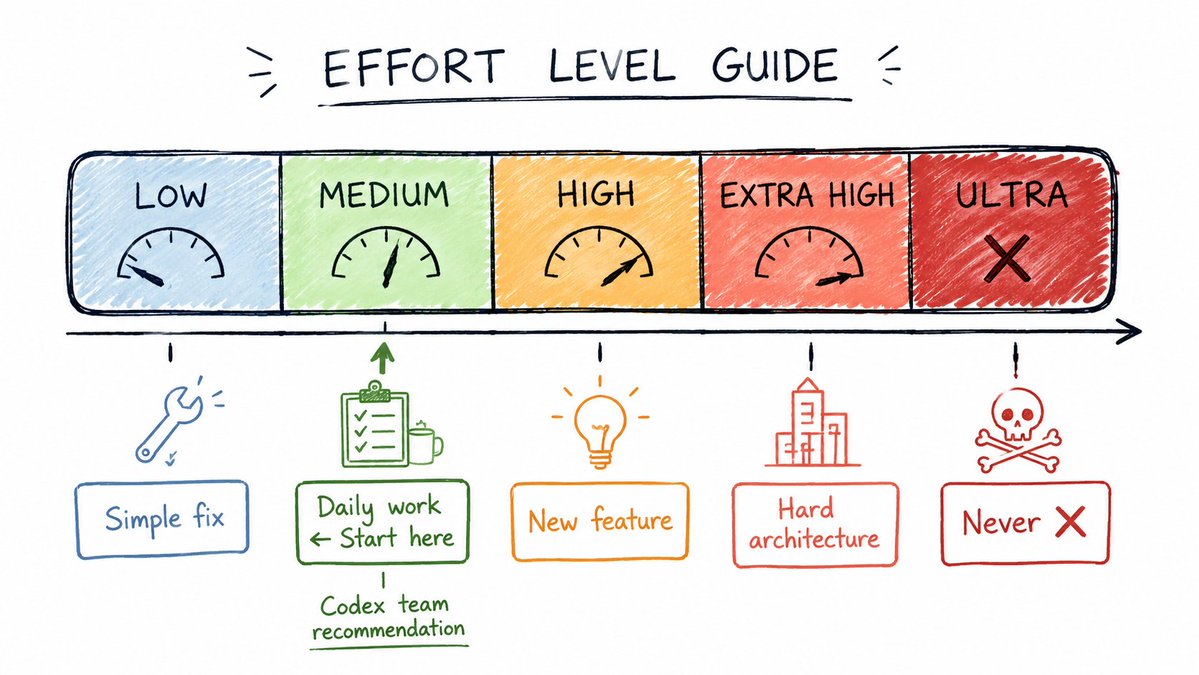
不是所有任务都需要同样的马力。
→ **Low / Medium** —— 常规任务、简单修复、文档、测试
→ **High** —— 功能、多文件修改、调试
→ **Extra High** —— 架构决策、安全审查、复杂多步骤工作
→ **Max** —— 留给你已经失败过的真正困难问题
→ **Ultra** —— 避免。永远避免。
大多数开发者的默认选择:**High。**
它已经足够强。High 上的 subagent 在消耗上“还不算太糟”。
Codex 团队给出的日常主力推荐:**Sol Medium。**
Sol Medium 在 agent benchmark 上超过 Claude Fable 5。价格只是零头。
你不需要所有事情都用 Extra High。
> Effort level cheat sheet:
>
> Simple fix → Sol Low or Medium\
> New feature → Sol High\
> Hard problem → Sol Extra High\
> Fast scan → Luna Extra High\
> Never → Ultra
━━━━━━━━━━━━━━━━━━
### **解释一切的 benchmark 数字**
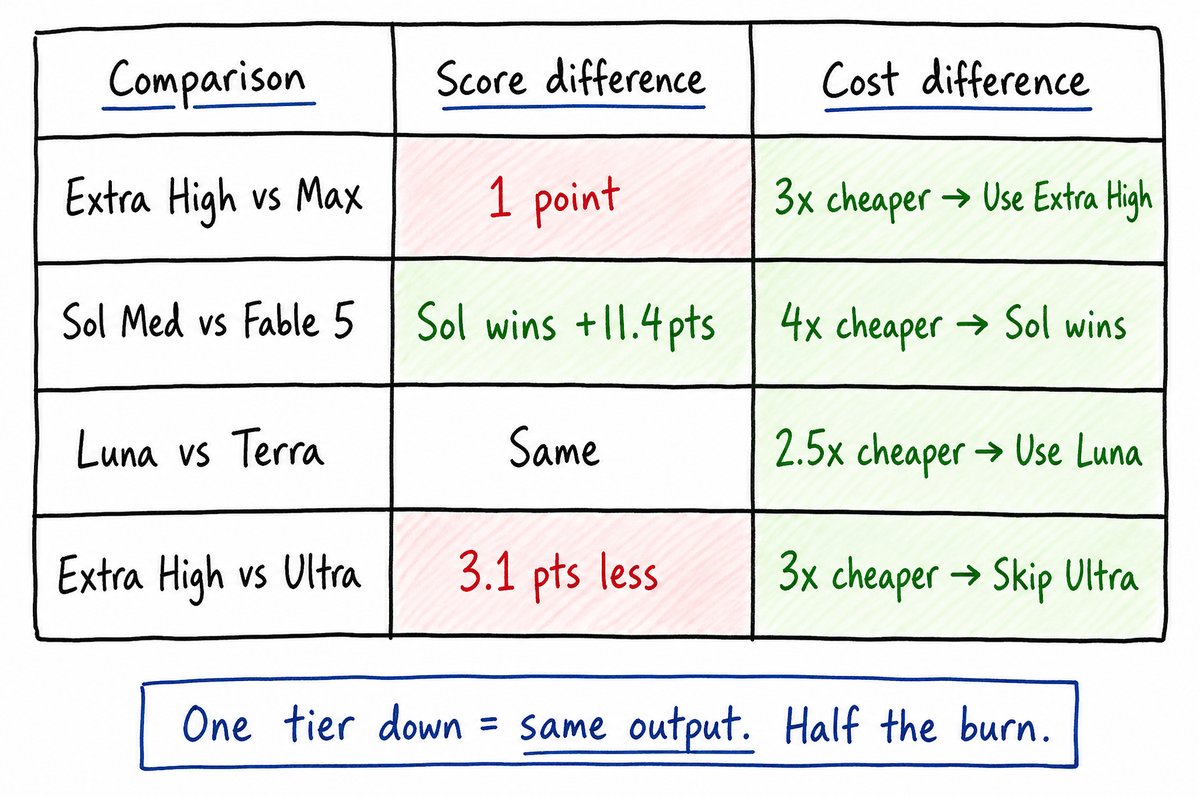
Sol Extra High vs Max:58 分 vs 59 分。只差 1 分。便宜 3 倍。用 Extra High。
Sol Medium vs Fable 5:Sol Medium 在 agent 工作流上赢 11.4 分。成本低 4 倍。
Luna Extra High vs Terra:性能相同。快 1.3 倍。便宜 2.5 倍。用 Luna。
Ultra vs Extra High:多 3.1 分。贵 3 倍。OpenAI 甚至没公布 Ultra 的 coding 结果。用 Extra High。
规律是:降一档 = 质量相同,价格大幅下降。
大多数开发者在所有事情上都跑高了一到两档。
这就是限额在 4 小时内消失的全部原因。
降一档。保持同样输出。把你的活跃窗口翻倍。
━━━━━━━━━━━━━━━━━━
### **前后对比**
这套设置之前:
→ Sol Ultra 跑所有东西
→ Subagent 克隆父模型和 effort
→ 3 个 subagent = 3 个 Sol Ultra 实例同时燃烧
→ 5 小时窗口 90 分钟就没了
→ 不知道到底是什么烧掉了它
这套设置之后:
→ Sol Extra High 做编排者
→ Sol Medium 做实现
→ Luna Extra High 做扫描
→ max_depth = 1 阻止递归启动
→ [AGENTS.md](http://AGENTS.md) 告诉 Sol 不要自动启动 agent
→ 每个 prompt 里的停止点控制模型走多远
结果:连续工作 48 小时。零次撞上限额。
同样的 200 美元套餐。完全不同的体验。
━━━━━━━━━━━━━━━━━━
### **完整设置清单**
现在就做这五件事:
→ 1. 打开 [AGENTS.md](http://AGENTS.md)。加入:"Only spawn subagents when I explicitly ask you to."
→ 2. 把 config.toml prompt 粘贴到 Codex。让它创建 3 个 agent 文件。
→ 3. 在 config.toml 里设置 max_depth = 1 和 max_threads = 6。
→ 4. 把你的默认 effort 切到 Sol High。不是 Ultra。也不是所有东西都用 Extra High。
→ 5. 给每个长时间运行的 prompt 加上明确停止点。
需要 10 分钟。
每周能替你省下数小时被烧掉的限额。
━━━━━━━━━━━━━━━━━━
### **还有一件事**
花点时间看看 ~/.codex 和 ~/.claude。
这些目录才是真正力量所在。
自定义 agent。路由策略。模型偏好。默认指令。
大多数人从来不打开它们。
现在最能用好 Codex 的开发者?
他们做了一些当时看起来很蠢的改动,结果惊讶地发现影响巨大。
实验。调整。通过 Codex dashboard 监控你的使用量。
小的配置改动,会复合成截然不同的 token 消耗率。
这是用 AI 构建东西最有趣的时刻。
工具会奖励那些真正愿意钻进去的人。
━━━━━━━━━━━━━━━━━━
如果这篇帮你省下了限额:
→ 转发,让其他 Codex Pro 用户在又烧掉一个窗口之前看到它
→ 关注 @sairahul1,获取更多 AI 系统拆解
→ 收藏这篇——配置 prompt 是可用的,今晚就粘贴
订阅 [theaibuilders.co](http://theaibuilders.co),阅读更多这类有意思的文章
我写 AI、产品构建,以及那些无需你盯着也能运转的系统。