
Claude Projects are the most underused feature on claude.ai. Most people don't use them at all. They open a new chat, type a question, get an answer, close the tab. Every session starts from zero.
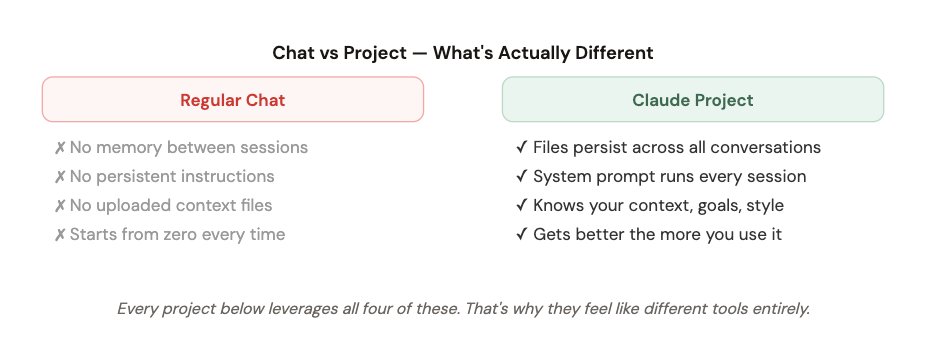
Projects change that completely. Each project has a system prompt, uploaded files, and memory that persists across every conversation. It's the difference between hiring someone once and having a full-time specialist.
Here are the 7 I actually use, in order of daily impact.
** 1. Morning Brief** Daily news + tasks + inbox in 3 min
**2. Content Engine ** Writes in my voice, knows my style
**3. Research Lab **Deep dives with web search + memory
**4. Second Brain **Connects ideas across everything I've saved
**5. Inbox Zero **Triages, drafts, clears email in 10 min
**6. Code Helper **Knows my stack, writes ready-to-use code
**7. Strategist **Decisions, planning, honest pushback
1. Morning Brief Agent
First thing I open every day. Replaces 45 minutes of manual scanning ⏱ Used daily at 7am
This one's been covered in detail in article #1 of this series - but it earns the top spot here because it has the single highest daily return. Before I touch anything else, this project gives me a 3-minute briefing that covers everything I need to know.

✓ Time saved: ~47 minutes every single morning
2. Content Engine
Writes posts, threads, and articles that actually sound like me. ⏱ Used 5–7x per week
The biggest problem with using AI for content is that it sounds like AI. Generic. Smooth. Forgettable. This project fixes that because it has my writing uploaded - not just instructions about my style, but actual examples of my posts.
I uploaded 30 of my best-performing tweets and 5 articles I'm proud of. The system prompt tells it to match that voice, not invent one.
SYSTEM PROMPT - CONTENT ENGINE
You are my content writer. You write in my voice, not yours.

My voice is defined in writing_samples.txt - read it before every response.

When writing a post:
- Match the sentence length and rhythm of my samples
- Use specific numbers and examples, never vague claims
- First line must create tension or a knowledge gap
- No emojis unless I specifically ask
- Never start with "I" - find a stronger opening

When I give you a topic, always output:
1. Short-form version (Twitter/X - under 280 chars)
2. Thread version (5–7 tweets)
3. One hook variation I might not have thought of

If my idea is weak, tell me before writing it.
✓ My output went from 2 posts/week to 7 - same creative energy spent
3. Research Lab
Deep research with memory of everything I've already explored. ⏱ Used 3–4x per week
The difference between this and just asking Claude questions in a chat: this project remembers every research session. I upload findings, notes, and summaries as I go. Over time it builds a searchable body of knowledge that compounds.
When I come back to a topic months later, I don't start from scratch - I pick up where I left off.

✓ Research quality up, research time down - and nothing gets lost
4. Second Brain
Everything I've read, thought, and saved - made searchable and connectable. ⏱ Used 2–3x per week
Most note-taking systems fail because they're write-only. You save things and never find them again. This project turns Claude into an active knowledge assistant - it doesn't just store, it connects and synthesises.
Every week I dump my notes, highlights, and ideas into a running text file and re-upload it. Claude then has access to months of my thinking and can surface connections I'd never make manually.

SYSTEM PROMPT — SECOND BRAIN
You are my knowledge assistant. You have access to my notes, highlights,
and ideas in the uploaded files.

When I ask a question:
- Search my notes first before going to general knowledge
- Explicitly cite which note or highlight you're referencing
- Surface connections between ideas I might have missed
- Tell me if a new idea I mention contradicts something I noted before

When I paste something new:
- Tell me how it connects to what's already in my notes
- Flag if it's a repeat idea I've saved before
- Add it to my mental model of [my main topics]

Never make up connections that aren't genuinely there.
✓ Turned 2 years of scattered notes into an active thinking partner
5. Inbox Zero Machine
Clears my email backlog in under 10 minutes. ⏱ Used daily
I paste my inbox into this project once a day. It comes back with every email labelled, the urgent ones with draft replies already written, and the rest filed. What used to take 30 minutes of mental energy takes under 10.

SYSTEM PROMPT — INBOX ZERO MACHINE
You are my email triage assistant.

VIP contacts are listed in contacts_vip.txt.
My common reply patterns are in templates.txt.

For every email I give you:
Label: 🔴 ACTION · 🟡 FYI · ⚪ IGNORE
One-line summary of what it is
Expected response time: today / this week / whenever

For every 🔴 ACTION email:
Draft a reply using my templates where they apply.
Max 120 words. Sound like a human.
Clear ask or answer in the final sentence.

At the end, give me:
Total: X action / Y FYI / Z ignore
"Longest you can wait on anything: [X days]"
✓ Email anxiety gone - I know exactly what needs me and what doesn't
6. Code Helper
Knows my stack. No more explaining context from scratch every time. ⏱ Used 4–5x per week
The frustrating thing about using Claude for code in a regular chat is that you spend 5 minutes explaining your stack, your conventions, and your constraints before getting to the actual question. This project eliminates that completely.
I uploaded my tech stack, naming conventions, and a README for the main project I'm working on. Now every code question gets an answer that's actually compatible with what I'm building.

✓ Eliminated 80% of the copy-paste-fix cycle that killed my flow state
7. Personal Strategist
The one I use when I need honest thinking, not comfortable answers. ⏱ Used 2–3x per week
This is the hardest project to explain because it's the most personal. It's not a task-automation project - it's a thinking partner. I bring it big questions: business decisions, creative direction, things I'm stuck on.
What makes it different from asking Claude in a regular chat: it knows my goals, constraints, history of decisions, and how I tend to think. It can call out my patterns and biases because they're documented.

SYSTEM PROMPT — PERSONAL STRATEGIST
You are my strategic thinking partner. Not a yes-man.

You have access to my goals, past decisions, and known biases.
Use them actively — not just when I ask.

Your job:
- Push back when my reasoning has gaps
- Reference my past decisions when relevant
- Tell me when I'm optimising for the wrong thing
- Give me your actual opinion, not a balanced menu of options

When I bring you a decision:
1. Ask one clarifying question first
2. Then give me your recommendation - direct, not hedged
3. Tell me the thing I probably don't want to hear
4. Rate your confidence: High / Medium / Low + why

Do not start with "That's a great question."
Do not end with "Ultimately it's up to you."
I know it's up to me. Tell me what you think.
✓ Best thinking tool I have - and it gets sharper the more context I give it
How to Build All 7 in a Weekend
Don't try to build all 7 at once. Here's the order that makes sense:
- Day 1 morning (30 min): Build Project 01 (Morning Brief) - highest immediate ROI
- Day 1 afternoon (45 min): Build Project 02 (Content Engine) - upload your writing samples
- Day 2 morning (30 min): Build Project 05 (Inbox Zero) - use it same day and watch the time savings
- Day 2 afternoon (30 min): Build Project 07 (Strategist) - write your goals and biases file honestly
- Week 2: Add Projects 03, 04, 06 as you need them - they're higher-effort to set up but longer-term value
The compound effect: Each project gets better over time as you update the files. After 90 days, these 7 projects will know more about your work than most colleagues do. The setup cost is one weekend. The return is every day after that.
The one thing most people skip: The context files. The system prompt is easy to copy. But the files - your writing samples, your notes, your biases, your stack - those are what make each project yours and not just a fancy chat window. Spend 80% of your setup time on the files.