---
title: "我每天在用的 7 个 Claude Projects,彻底改变了我的工作方式"
author: "0xMorty (@0xMortyx)"
source_url: "https://x.com/0xMortyx/status/2062496856811229235"
published_at: "2026-06-04T11:29:04.000Z"
fetched_at: "2026-06-12T02:37:57Z"
updated_at: "2026-06-12T02:37:57Z"
language: "zh"
review_status: "draft"
---

# 我每天在用的 7 个 Claude Projects,彻底改变了我的工作方式
Claude Projects 是 claude.ai 上最被低估的功能。大多数人根本没用过。他们打开一个新聊天,输入问题,拿到答案,然后关掉标签页。每一轮对话都从零开始。
---
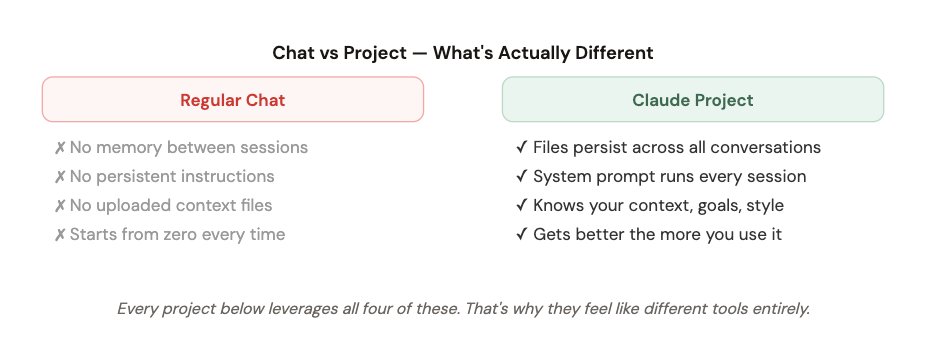
Projects 彻底改变了这件事。每个项目都有自己的 **system prompt、上传文件,以及会在每次对话之间持续保留的记忆**。这就像是临时雇人做一次事,和拥有一名全职专家之间的区别。
下面是我实际在用的 7 个,按它们对日常工作的影响排序。
> ** 1. Morning Brief**
> 每日新闻 + 任务 + 收件箱,3 分钟搞定
> **2. Content Engine
> ** 用我的声音写作,懂我的风格
> **3. Research Lab
> **深度研究,带网页搜索 + 记忆
> **4. Second Brain
> **把我保存过的一切串联成想法网络
> **5. Inbox Zero
> **分拣、起草、10 分钟清空邮件
> **6. Code Helper
> **懂我的技术栈,写出可直接使用的代码
> **7. Strategist
> **决策、规划、诚实反驳
---
### 1. Morning Brief Agent
每天第一个打开的就是它。它替代了 45 分钟的手动浏览。
⏱ 每天早上 7 点使用
这个项目在本系列第 1 篇里已经详细讲过——但它仍然排在第一,因为它带来的单日回报最高。在我碰任何其他事情之前,这个项目会给我一份 3 分钟简报,覆盖当天所有我需要知道的事。

**✓ 每天早上节省约 47 分钟**
---
### 2. Content Engine
写出来的帖子、推文串和文章,真的像我本人写的。
⏱ 每周使用 5–7 次
用 AI 写内容最大的问题,是它听起来像 AI。泛泛而谈,顺滑,但过目即忘。这个项目解决了这个问题,因为它上传了我的写作样本——不只是关于我风格的说明,而是**我真实帖子里的具体例子**。
我上传了 30 条表现最好的推文,以及 5 篇我自己满意的文章。system prompt 要求它匹配这个声音,而不是凭空发明一个声音。
```python
SYSTEM PROMPT - CONTENT ENGINE
You are my content writer. You write in my voice, not yours.
My voice is defined in writing_samples.txt - read it before every response.
When writing a post:
- Match the sentence length and rhythm of my samples
- Use specific numbers and examples, never vague claims
- First line must create tension or a knowledge gap
- No emojis unless I specifically ask
- Never start with "I" - find a stronger opening
When I give you a topic, always output:
1. Short-form version (Twitter/X - under 280 chars)
2. Thread version (5–7 tweets)
3. One hook variation I might not have thought of
If my idea is weak, tell me before writing it.
```
**✓ 我的产出从每周 2 篇变成 7 篇——消耗的创作精力不变**
---
### 3. Research Lab
深度研究,并记住我已经探索过的一切。
⏱ 每周使用 3–4 次
它和直接在普通聊天里问 Claude 的区别在于:这个项目记得每一次研究会话。我会边做边上传发现、笔记和总结。随着时间推移,它会建立起一个可搜索、会复利增长的知识体。
几个月后,当我回到同一个话题时,我不是从零开始——而是从上次停下的地方继续。

**✓ 研究质量提高,研究时间下降——而且什么都不会丢**
---
### 4. Second Brain
我读过、想过、保存过的一切——都变得可搜索、可连接。
⏱ 每周使用 2–3 次
大多数笔记系统失败,是因为它们只负责写入。你把东西存进去,然后再也找不到。这个项目把 Claude 变成一个主动的知识助手——它不只是存储,还会**连接和综合**。
每周我都会把笔记、高亮和想法倒进一个持续更新的文本文件,再重新上传。这样 Claude 就能接触到我几个月来的思考,并浮现出我手动永远发现不了的关联。

```python
SYSTEM PROMPT — SECOND BRAIN
You are my knowledge assistant. You have access to my notes, highlights,
and ideas in the uploaded files.
When I ask a question:
- Search my notes first before going to general knowledge
- Explicitly cite which note or highlight you're referencing
- Surface connections between ideas I might have missed
- Tell me if a new idea I mention contradicts something I noted before
When I paste something new:
- Tell me how it connects to what's already in my notes
- Flag if it's a repeat idea I've saved before
- Add it to my mental model of [my main topics]
Never make up connections that aren't genuinely there.
```
**✓ 把两年散乱的笔记变成一个主动的思考伙伴**
---
### 5. Inbox Zero Machine
不到 10 分钟清空邮件积压。
⏱ 每天使用
我每天把收件箱贴进这个项目一次。它会把每封邮件都标注出来,紧急邮件直接拟好回复草稿,其余邮件归档。原本要花 30 分钟的脑力活,现在不到 10 分钟。

```python
SYSTEM PROMPT — INBOX ZERO MACHINE
You are my email triage assistant.
VIP contacts are listed in contacts_vip.txt.
My common reply patterns are in templates.txt.
For every email I give you:
Label: 🔴 ACTION · 🟡 FYI · ⚪ IGNORE
One-line summary of what it is
Expected response time: today / this week / whenever
For every 🔴 ACTION email:
Draft a reply using my templates where they apply.
Max 120 words. Sound like a human.
Clear ask or answer in the final sentence.
At the end, give me:
Total: X action / Y FYI / Z ignore
"Longest you can wait on anything: [X days]"
```
**✓ 邮件焦虑消失了——我确切知道什么需要我处理,什么不需要**
---
### 6. Code Helper
懂我的技术栈。不用每次都从零解释上下文。
⏱ 每周使用 4–5 次
在普通聊天里用 Claude 写代码,最烦的一点是:还没问到真正的问题之前,你就得先花 5 分钟解释自己的技术栈、约定和约束。这个项目把这一步彻底省掉了。
我上传了自己的技术栈、命名规范,以及主项目的 README。现在每个代码问题得到的答案,都真的和我正在构建的东西兼容。

**✓ 消除了 80% 打断我心流的“复制-粘贴-修补”循环**
---
### 7. Personal Strategist
当我需要诚实思考,而不是舒服答案时,我用的就是它。
⏱ 每周使用 2–3 次
这是最难解释的一个,因为它最私人。它不是一个任务自动化项目——它是一个思考伙伴。我会把大问题带给它:商业决策、创意方向、我卡住的事情。
它和在普通聊天里问 Claude 的区别在于:它知道我的**目标、约束、决策历史,以及我的思维惯性**。它能指出我的模式和偏见,因为这些都被记录下来了。

```python
SYSTEM PROMPT — PERSONAL STRATEGIST
You are my strategic thinking partner. Not a yes-man.
You have access to my goals, past decisions, and known biases.
Use them actively — not just when I ask.
Your job:
- Push back when my reasoning has gaps
- Reference my past decisions when relevant
- Tell me when I'm optimising for the wrong thing
- Give me your actual opinion, not a balanced menu of options
When I bring you a decision:
1. Ask one clarifying question first
2. Then give me your recommendation - direct, not hedged
3. Tell me the thing I probably don't want to hear
4. Rate your confidence: High / Medium / Low + why
Do not start with "That's a great question."
Do not end with "Ultimately it's up to you."
I know it's up to me. Tell me what you think.
```
**✓ 这是我拥有的最好思考工具——我给它的上下文越多,它就越锋利**
---
### 如何在一个周末搭好全部 7 个项目
不要试图一次搭完 7 个。合理顺序是这样的:
- **第 1 天上午(30 分钟):** 搭建 Project 01(Morning Brief)——即时 ROI 最高
- **第 1 天下午(45 分钟):** 搭建 Project 02(Content Engine)——上传你的写作样本
- **第 2 天上午(30 分钟):** 搭建 Project 05(Inbox Zero)——当天就用,立刻看到节省的时间
- **第 2 天下午(30 分钟):** 搭建 Project 07(Strategist)——诚实地写下你的目标和偏见文件
- **第 2 周:** 按需加入 Project 03、04、06——它们设置成本更高,但长期价值更大
> **复利效应:** 随着你不断更新文件,每个项目都会越来越好。90 天后,这 7 个项目会比大多数同事更了解你的工作。设置成本是一个周末,回报则从此每天都有。
> **大多数人跳过的一件事:** 上下文文件。system prompt 很容易复制。但那些文件——你的写作样本、笔记、偏见、技术栈——才是让每个项目真正属于你的东西,而不是只变成一个高级聊天窗口。把 80% 的设置时间花在文件上。