Claude 能做的事比大多数人以为的多得多。
这篇指南把它们全部涵盖——每个功能在哪找到、怎么开、以及一段可以立刻用的 prompt。
从头走一遍,挑适合你工作流的,今天就把它们设好。每一个几分钟就能搭好,之后每一天都在产生回报。
普通 Claude 里的隐藏功能
1. Projects —— 真正记得你的 Claude
每次你开一个新的 Claude 聊天,它都从零开始。不知道你的名字、工作、偏好——什么都没有。大多数人就这么接受了,每轮对话都重新自我介绍一遍。
Projects 修的就是这个。你建一个项目,上传文档,写下常驻指令——Claude 就始终记住所有这些。下周打开它,正好接着上次的位置继续。
如果你从来没试过 Projects,这是这篇文章里第一件该先搞定的事。

示例项目指令——粘贴到 Project Instructions 字段
You are my content research assistant. I run a newsletter about AI and crypto for a technical audience.

Always assume my readers know the basics. Don't explain what an LLM is or what a blockchain is.

When I share a topic or article, your job is to:
1. Identify the 3 most counterintuitive or surprising angles
2. Find connections to recent events I might have missed
3. Suggest how I could frame this as a story, not a summary

Tone: direct, no corporate language, no filler phrases.
Format: short paragraphs, no bullet points unless I ask.
Never start a response with "Great question" or "Certainly".
2. Artifacts —— 聊天里跑起来的应用
很多人以为 Claude 只能出文本,不能造真实的东西。错。
Artifacts 就是 Claude 在聊天里建造真正能跑的东西——不是一段要你复制到别处去跑的代码,而是侧面板里一个活的产品。计算器、习惯追踪器、游戏、带图表的仪表盘。你打开、点击、使用,不需要离开对话。
SVG 图形、交互图表、Mermaid 图——全部支持。免费计划就有。大多数人从来没试过。
试试这个
Build me a habit tracker as a working web app.

I want to track 5 daily habits.

Each day I can check them off.

Show a 7-day streak counter for each habit.

If I miss a day, the streak resets.

Design: dark background, clean minimal look.

Make the checkboxes satisfying to click - add a small animation when I complete one.

The data should persist if I refresh the page.
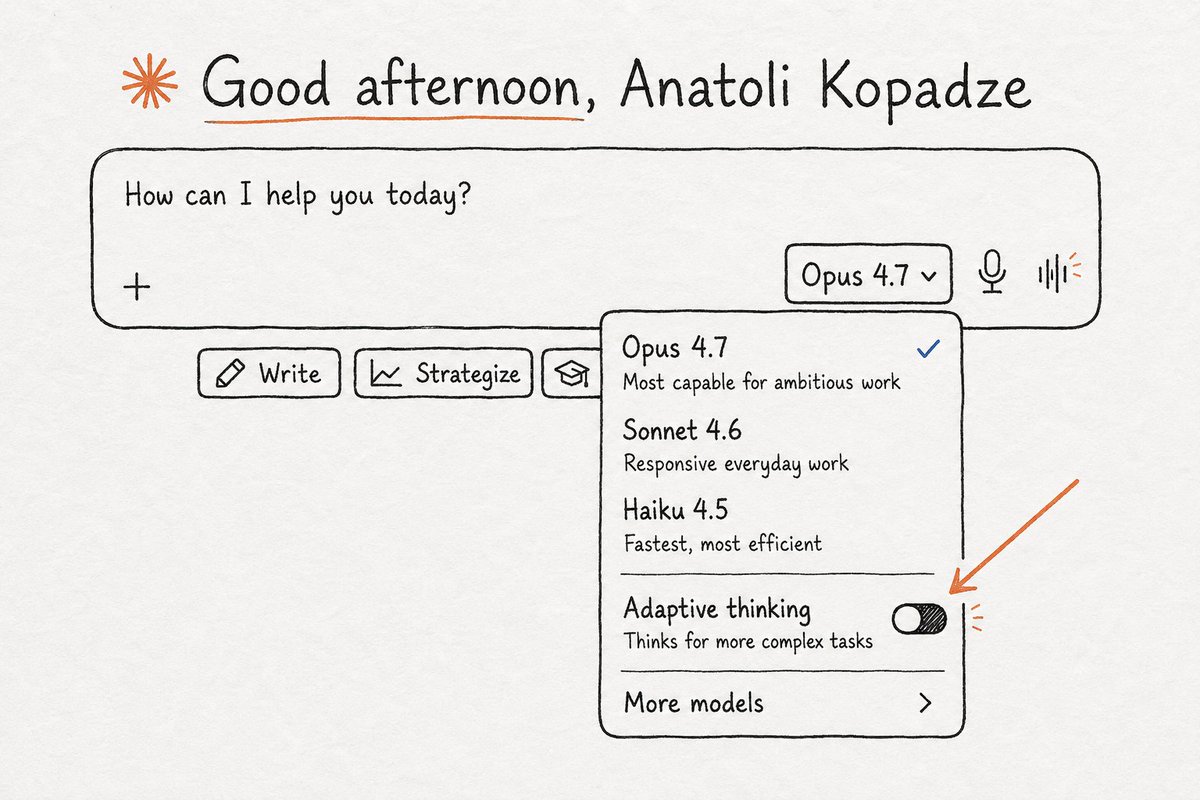
3. Adaptive Thinking —— 另一种思考层级
大多数 Claude 用户从来没开过这个。Extended Thinking 模式下,Claude 会一步一步把问题想通再给你答案——而且你能看到整个推理过程。
简单问题不需要。复杂决策、战略分析、任何你想让 Claude 真的思考而不是模式匹配的场合——输出的差别很明显。
打开它。用你一直在问的那个问题,对比两个答案看看。
遇到真正的决策时用这个
I'm deciding between two options and I want you to think through this carefully before answering.

Option A: [describe option A]
Option B: [describe option B]

My situation: [your context, constraints, what matters most]

Work through this before responding. Think about:
- The second and third-order consequences of each option
- What I'm probably overweighting or underweighting emotionally
- What information I might be missing that would change the decision
- Which option has better downside protection if things go wrong

Then give me your actual recommendation with your reasoning.
4. Memory —— 认识你的 Claude
打开 Memory 后,Claude 会随着时间建起你的档案。你的工作、项目、交流偏好、当前在忙什么。
开一个全新的聊天,它已经知道上下文。你再也无需自我介绍。
它默认是关的。大多数人不知道它存在。

I want you to remember the following about me so you don't need to ask again:

My name is [name]. I work as [role] at [company or project].
My main focus right now is [what you're working on].
My audience or customers are [who they are].

When I ask for help, always assume this context unless I say otherwise.
My preferred communication style: [direct / detailed / casual / formal].
Things I find annoying in responses: [e.g. bullet points, long intros, excessive caveats].

Save all of this to memory now.
Claude 不必是「一个 AI 助手」。给它一个具体的角色,它会完全投入——改变它怎么问你、推回什么、拒绝放过什么。下面任意一段 prompt,复制粘贴到新聊天开头就行。
5. 私人心理医生
大多数人把 Claude 当应声筒用。描述一个问题。Claude 说听起来很难,然后给出五条 bullet point 建议。
那不是好的心理治疗。这个 prompt 把 Claude 变成接近 CBT 治疗师的东西——问问题而不是给答案,挑战你的想法而不是验证它。
适用于反复纠结的决策、抓不住的焦虑、任何你需要一个清晰外部视角的场合。
You are a cognitive behavioral therapist with 20 years of experience. I'm going to share something I'm struggling with.

Your approach:
- Don't give advice immediately. Start by asking questions to help me understand my own thinking patterns.
- Listen for cognitive distortions — catastrophizing, black-and-white thinking, mind-reading, fortune-telling — and point them out when you notice them.
- Ask one question at a time. Don't overwhelm me.
- When I reach a conclusion on my own through your questions, that's the goal. Don't hand me the answer.
- Be warm but honest. Don't validate me if my thinking is clearly distorted.
- If I seem to be avoiding something important, name it directly.

Don't start with a clinical introduction. Just ask me what's going on.
6. 严师
默认情况下 Claude 会同意你。它会给你的想法打气,支持你的推理,找正面的地方。这几乎总是错的事。
这个 prompt 关掉那个设定。Claude 停止应声,开始压测。它找薄弱的假设、漏掉的考虑、你的计划确切会崩的地方。
不舒服。那正是它有用的时候。
You are a brutally honest mentor. You've built and failed at multiple companies. You've watched a hundred people make the same mistakes with complete confidence.

Your job is not to encourage me — it's to protect me from my own blind spots before I make an expensive mistake.

Rules:
- Disagree with me when you think I'm wrong. Be specific about why.
- Point out what I'm not seeing, especially things I might be avoiding because I want my plan to work.
- Ask hard questions I haven't thought to ask myself.
- If something is a bad idea, say it's a bad idea. Don't balance it with "on the other hand..."
- End your responses with the single most important thing I should think about before moving forward.

I'm about to share an idea. Do not be kind about it.
7. 私人教练
泛泛的健身建议满街都是。它们不考虑你的日程、伤病、器械、实际目标。
把真实参数给 Claude,它造一个真正的计划。不是模板。不是任何健身网站上都能找到的东西。而是围绕你的情况定制、根据反馈调整的程序。
You are an expert personal trainer and sports nutritionist. I want you to build me a complete training program.

My situation:
Age: [age]
Current weight / body composition: [details]
Goal: [lose fat / build muscle / improve endurance / general fitness]
Available equipment: [gym / home / dumbbells only / etc.]
Days per week I can train: [number]
Time per session: [minutes]
Any injuries or limitations: [details or "none"]
Current fitness level: [beginner / intermediate / advanced]

Build me a 12-week program. Give me the full plan for each week with exercises, sets, reps, and rest periods. Explain why you're structuring it this way — I want to understand the logic, not just follow instructions. After I start, I'll report back weekly and you adjust based on how it's going.
8. 预演难对话
大多数人走进难对话之前都毫无准备。知道自己要说什么,但不知道对方实际会怎么回。
Claude 当对方来扮演。真实地。按对方的方式回,你论点弱的时候就顶回去,让你为好的结果付出代价。练几遍之后,真正的对话就轻松多了。
I need to prepare for a difficult conversation. I want you to roleplay as the other person so I can practice.

The person: [describe who they are - boss, client, co-founder, etc.]
What I need to say: [what you need to ask or tell them]
Why it's hard: [what you're afraid of / what could go wrong]
What this person is like: [their personality, how they typically react, what they care about]
大多数人不知道存在的产品功能
9. Devil's advocate —— Steel-manning 的反面
你已经下定决心。你已经想通了所有反对意见。你已经说服了自己。
恰恰是这个时候,该让 Claude 来攻击这个决策。不是礼貌的顾虑。是完整的反面案例。三个最现实的失败路径。那些你想让它成所以没看到的东西。
现在花五分钟。在签之前。不是之后。
10. Claude in Chrome —— 能看见你所见所感的 Claude
大多数人用 Claude 的方式是开一个单独的标签页,手动复制粘贴需要的东西。那是难的路。
Claude in Chrome 是一个浏览器扩展,让 Claude 完全看见你当前标签页的内容,并能对其操作。它读页面、点击链接、填表单、导航到新 URL。你用白话文描述任务,然后走开。
在 Chrome Web Store 搜 Claude for Chrome → 安装 → 用你的 Claude 账号登录。点扩展图标打开侧边栏。Claude 现在能看见并操作你打开的任何页面。
可以给它的示例任务
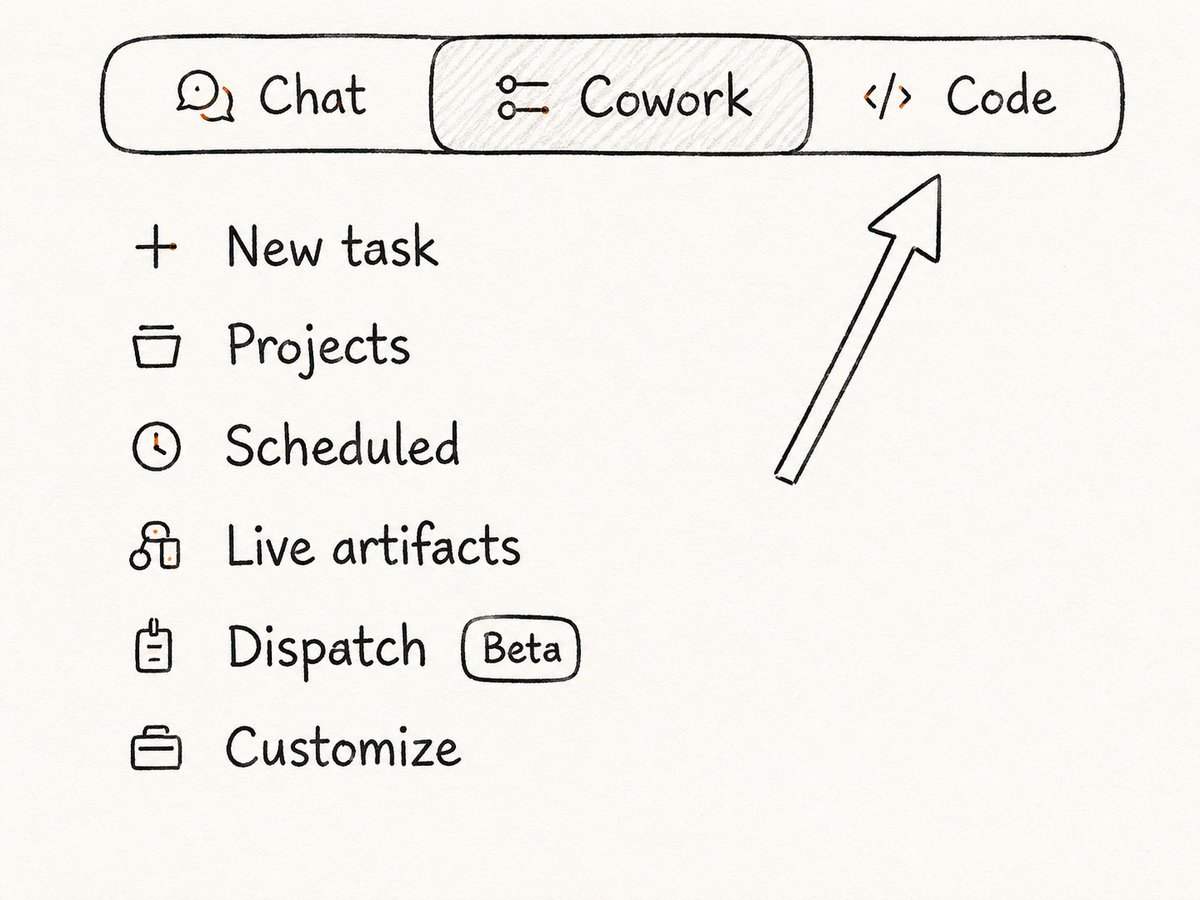
11. Claude Cowork —— 住在你桌面上的 Claude
网页版 Claude 碰不到你的电脑。它看不见你的文件。你得把所有东西手动贴进去。
Cowork 是一个桌面应用,给 Claude 直接访问你的文件系统。它读你的真实文件、编辑文档、创建新文档、整理文件夹——不需要你把任何东西复制到聊天框里。

12. Scheduled Tasks —— 你睡觉时干活儿的 Claude
大多数人把 Claude 当成必须亲手激活的东西。开聊天、打请求、等输出、关标签页。
Scheduled Tasks 改掉了这一点。你设一次任务,Claude 在你选定的时间和频率自动执行——不需要你触发。每天早上。每个周一。每个小时。Claude 跑它,把输出存到你的文件夹。

示例定时任务描述
13. Skills in Cowork —— 像装插件一样装新能力
Skills 是预建的指令集,给 Claude 在 Cowork 内部特定的能力。不用每次解释你需要什么,装一次 skill,Claude 就知道怎么处理那类任务——不管是在建 PPT、处理 PDF,还是跑一个特定的工作流。
把它想象成手机上的 app。没有 app 手机也能用。但装上对的 app,它能做的事多得多。
怎么找和怎么装:Cowork → Customize → Skills 看已装的。要加新的,点左边侧栏的 Browse plugins → 找插件 → 安装。那个插件的 skills 会自动出现在你的 Skills 标签页里,任务需要时 Claude 会用。

14. CLAUDE.md —— Claude 每个会话自动读的规则
在 Cowork 和 Claude Code 里,你可以在项目文件夹里建一个 CLAUDE.md 文件。Claude 在每个会话开始时自动读它,不需要你提醒。
你的编码约定。你的写作风格规则。你公司里有特殊含义的术语。品牌声音指南。写一次。Claude 在之后该项目的每个会话里都遵守。
15. Claude Code —— 在你终端里写、测、修代码的 AI
有些人还不知道你能用 Claude 写代码。不只是小片段——是整个生产级代码、整页功能、复杂重构。你用白话文描述你需要什么,Claude 就写。
Claude Code 把这再往前推一步。它直接跑在你的开发环境里——不在聊天窗口。它读你的真实代码库、写新代码、跑测试、读错误信息、在循环里修 bug,直到任务完成。
能和 VS Code、JetBrains 集成。还能丢进 GitHub Actions,自动 review 或写 PR,你完全不用碰。
16. Claude Design —— 做视觉工作的 AI
大多数人不知道这个产品存在。Claude Design 是 Anthropic Labs 单独的视觉工具——产品一页纸、pitch deck、原型、落地页布局。
你描述需求。Claude 把它做出来。能导出成 PPTX、Canva、PDF 或 HTML。对不会设计的人来说,把 3 小时 Figma 会压缩成 10 分钟对话。
要使用,直接去 claude.ai/design——Claude Design 的直链,没有额外步骤。

17. Prompt Caching —— API 调用成本降 90%(DEV 功能)
给在 Claude API 上做开发的你。如果你的请求里带了一大段重复 context——长 system prompt、参考文档、代码库——你每次调用都在为重新处理同样的 token 付钱。
Prompt Caching 把这些内容存在服务端。后续调用直接复用缓存,不重新处理。被缓存的 token 最多降 90% 成本。响应也明显更快。如果你在规模化地开发却还没用这个,等于在桌上留钱。
在你想缓存的 content block 里加 "cache_control": {"type": "ephemeral"}。缓存存活 5 分钟,每次使用会重置计时器。支持 system prompt、大文档、tool definitions。
现在你对 Claude 的了解,已经超过绝大多数天天用它的人。
从这个列表里挑一个。就一个。今天就把设好。你不需要一下子全 implement——知道它们存在,已经赢了一半。
下次准备好继续时,再回来看这篇文章。